
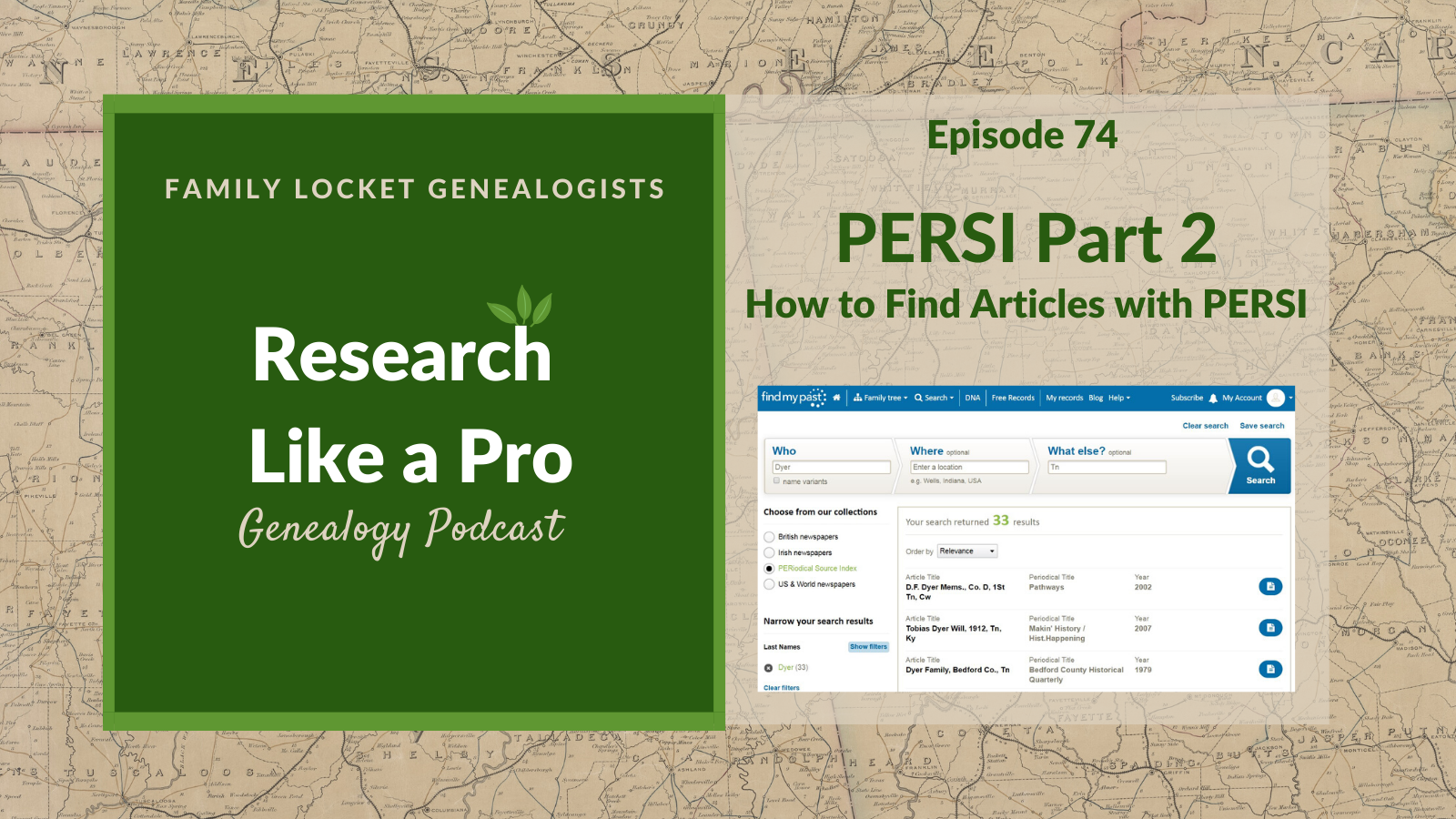
Today’s episode of Research Like a Pro is about how to find articles using the Periodical Source Index (PERSI). There are two different search pages to use. Learn about the differences between them and how to use them effectively to find the articles that might help in your research. We also go over 7 ways to obtain the articles you find in the Periodical Source Index, and how to search using state postal codes. Update 2022: The Allen County Public Library’s Genealogy Center now hosts the Periodical Source Index at the following URL: https://www.genealogycenter.info/persi/.
Transcript
Nicole (1s):
This is Research Like a Pro Episode 74: PERSI Part 2 – How to Find Articles. Welcome to Research Like a Pro a Genealogy Podcast about taking your research to the next level, hosted by Nicole Dyer and Diana Elder accredited genealogy professional. Diana and Nicole are the mother-daughter team at FamilyLocket.com and the creators of the Amazon bestselling book, Research Like a Pro a Genealogists Guide. I’m Nicole co-host of the podcast join Diana and me as we discuss how to stay organized, make progress in our research and solve difficult cases. Let’s go.
Nicole (45s):
Hi everyone and welcome to the show. I’m Nicole Dyer, co-host of The Research Like a Pro Genealogy Podcast. I’m here with accredited genealogist, Diana Elder. Hi, Diana, how are you?
Diana (56s):
I am good. Kind of recuperating from Thanksgiving. And you just had a fun Thanksgiving.
Nicole (1m 3s):
Yeah, we just got back from San Diego last night. So we’re recording this episode just the day after Thanksgiving weekend. I’m excited to get my Christmas decorations up. We did a really fun Mayflower Thanksgiving program talking about our ancestors from the Mayflower. And I ended up making these little papers that I passed out to everybody that said you are a 10th great grandchild of John Alden on the Mayflower. So they would open that. And then we would do a little skit about John Alden and it wasn’t really planned out or anything. It was very simple. I had just printed some biographies of each person we were related to and I read it. So I was the narrator and then the kids just kind of acted out what I was saying.
Diana (1m 45s):
Such a cute idea. And I love that you were just really simple with it and you didn’t make it too big of a production, but it was probably so fun for everyone.
Nicole (1m 53s):
Yeah, it was actually really easy and fun. And one of the little biographies that I read was about one of the guys, the Mayflower had gone out from Plymouth to chop down thatch, I think they use that for their roofs and he and his companion had gone into the woods to get thatch and they got lost. And so Jacob just went out of the room and then he came back in. It was just fun. It was memorable. And so that’s, what’s great about these little things that we do with our families and family history is that it’s memorable. And then when we were talking about John Alden, my brother-in-law was like, oh, I remember grandma talking about The Courtship of Miles Standish, the poem by Longfellow, and how he wanted to marry Priscilla Mullins.
Nicole (2m 35s):
But then she ended up marrying John Alden. Anyway, it was fun because everybody got to talk and share and we were all talking about it and the kids were doing it too. And, and I had one of my nephews reading William Bradford’s journal entries about each person. It was fun.
Diana (2m 50s):
That sounds like a great little family history tie-in to Thanksgiving. So fun. Well, let’s get on with our listener spotlight today. And this is from Web Fan 50, “This podcast has great information for its listeners. Nicole and Diana, do a great job with letting the listeners know where and how to find information for their genealogy searches from beginners to advanced, they let you know how to do the correct things to become a better genealogist.” Well, thank you for that review. We appreciate every single review, comment that our listeners give us. So we’re excited that it’s helping you and everyone else listening. So, Nicole, what are we talking about today?
Nicole (3m 33s):
Well, today we’re going to continue talking about how to use the Periodical Source Index, otherwise known as PERSI. And last time we gave you a lot of examples of what you might find when you’re using PERSI, when to use it, and some example, subjects and periodical titles and articles. But today we’re going to really talk about how to use the index, how to find the articles that you want and obtain them. So let’s dive in. So there are two pages for searching PERSI on FindMyPast. As we talked about last week, FindMyPast is the website that now hosts the Periodical Source Index. So the first option and my preferred search page is findmypast.com/search/periodical-source-index with dashes in between those three words.
Nicole (4m 23s):
And the link is in the handout that I’ve linked to in the show notes. So this is a better search page because it’s similar to a database and the other search page is more similar to a catalog. So you have to know the title of the article that you’re looking for and the exact periodical, so that one’s harder, but this one is easier for if you’re just wanting to go and see what’s available about a certain name or about a place, I would prefer this one and the way that you can get to it from the homepage of FindMyPast is just to click on search and then narrow it to newspapers and periodicals and from there and go to the Periodical Source Index.
Nicole (5m 7s):
So from this search page, you can use the following search fields: who, where, and what else. So there’s really just those three. So in the who search field, you would put the surname, if you have a surname, and then in the where field you would put a location, like at state or something, and then for what else you can put in keywords. And then after you put in a couple of search terms into those, or just one, you can use the filters on the sidebar to narrow down your results. And some of the filters are last name’s country, state, county, town, subject, article keyword, periodical, publisher, publication year, and the check box next to How To just indicating if it’s a, How To, or methodology article.
Nicole (5m 56s):
And then, like I mentioned, option two is similar to a catalog. So this option for searching PERSI is at www.FindMyPast.com/PERSI, then click on discover the Periodical Source Index. And so this one is harder to search because there’s only a few things that you can put in. You can’t just search it like a database. You have to know the periodical title or the article title that you’re looking for. So if you know the exact name of the article that you’re looking for, you have to type it in exactly. And then you’ll get to it. So I don’t recommend using this search page unless you know those things.
Nicole (6m 38s):
So those are the two places you can go to search PERSI.
Diana (6m 41s):
Well, I’m really glad that you figured out that there are those two different places, because I had done this research project, you know, on the Swedes in Massachusetts. And I had just happened upon the page that was like the database. And I had used that to get all these great periodicals. And then I tried to redo that search. And somehow I got onto the other one that’s more like the catalog and I couldn’t replicate my searches. And I was so confused and frustrated that I couldn’t pull up all the same articles. And so I think it was you that got on there and you looked around, you said, oh, that’s a different page and it’s confusing, but it’s really important to understand that yeah, there’s two different ways to search it.
Diana (7m 23s):
So I’m very glad that you have laid that out. And this handout that we’re sharing has the links to that and explains that really thoroughly. So thank you for putting us together so that I can keep using this in the future because I’m sure I’ll go back and I’ll forget. How did I get to that database type searching? Well, let’s talk about now how to obtain an article once you find it on PERSI. So you’ve gone to Find My Past, you’ve put in your keywords, your surnames, you found the perfect article and you cannot wait to order that and, and take a look at it. So how do you do that? Well, first of all, you could start online to look for a digitized copy. Find My Past is working with the periodical publishers to digitize each of the articles in PERSI.
Diana (8m 6s):
And if there’s a camera icon next to the entry, that means you can get a digitized copy of the article at Find My Past. And you can view it if you have a subscription or if you want to purchase pay-as-you-go credits. So in the future, maybe we’ll have all of those digitized, which would be fabulous. But if you do not have the little camera icon, you’re going to have to go find that article elsewhere. Now there are other online websites that could have this periodical digitized. You could try HathiTrust, Internet Archive, or Google books, and you never know. So it’s a good practice to go to those sites and try searching or to do a Google search and see if perhaps a genealogy society has digitized the copy of that particular periodical.
Diana (8m 57s):
I know one of the periodicals I needed. I went to a genealogy society website, and I think I had to pay just a small fee, maybe like two or $3. And then they sent me a PDF version of it right away. And so there’s so many different options out there for trying to find these that have been digitized online. So just try a variety of things. And also you’ll want to keep note in your research log of what you’ve tried. So you don’t keep replicating your searches, put it in your research log and say, I searched here. It’s not there. It’s not here. It’s not here. And then you can go on to the next step.
Nicole (9m 36s):
So another way to get your article, once you’ve found it is to simply just contact the publisher. And you can do that by searching online for the website or contact information for the journal and the journal publisher. And sometimes it will be a historical society or a genealogy society. And some of them may be defunct now, but if not, they may publish digitized versions of their journal on their website. So you could find it that way just by Google searching the journal, or you can reach out to them by email, if they have an email address listed and they could even just send you a PDF copy of the article that you’re asking for, or give you extra help. You never know what you might get.
Nicole (10m 16s):
So it’s a good idea to reach out and ask first, just in case they’re able to do that.
Diana (10m 24s):
Great. Okay. So step number three, or option number three, is to actually visit the Allen County Public Library. So each article indexed in PERSI is located physically at the Allen County Public Library, which is located in Fort Wayne, Indiana. And if you’re making a trip to the Midwest, you could certainly visit the library yourself and view the article
Nicole (10m 48s):
And the fourth way to get your article, if none of those work, is to just order the copy from Allen County Public Library, and they allow you to order copies of articles found in PERSI using an order form that we will link to in this handout. And the charge is $7.50 per order form. And you have to prepay. So you send the form along with your money. And the form allows you to request up to six articles at a time. And then if they find the article for you, which they should have it because it’s in the index, then they will copy it for you. And then you’ll be billed 20 cents per page copied. And often you don’t know how many pages there will be in an article.
Nicole (11m 31s):
So just be aware that it could just be one page, five pages, or 20 pages depending on the article.
Diana (11m 40s):
Great. So another option is to visit a nearby library. You can use WorldCat, which is a website that lists libraries near you, and you can search within WorldCat for that specific periodical. You might find a library that is in a nearby university, or in my case at the FamilyHistory Library, and find that they carry the journal with the exact article that you want, or that you need. Often more libraries carry the journal than are listed in the repository field in PERSI, but these additional locations, they only have some of the volumes. If you are coming to the FamilyHistory Library to search, just be aware that the catalog is a little tricky for some of these journals.
Diana (12m 24s):
I know when I was doing my research on the Swedes in Massachusetts, I had to really look at the catalog and really had to put on my detective hat to figure out how to get the journal that I needed. So just be aware, it might take a little bit searching, but that’s what we’re good at as researchers figuring out how to find these things, so visit a nearby library.
Nicole (12m 47s):
So the next way that you could order your article is through interlibrary loan. And this is my preferred method. I live in Pima county, Arizona. So that’s how I usually do it. I go to the Pima county library website and I request the periodical and the specific article through our free interlibrary loan service. And sometimes the library will just email me a copy of the article as a PDF. So that’s my favorite when that happens. Cause usually it’s super fast and the way they do it is they’ve contacted the library that they find in their system that has the periodical and they ask them to send it. And sometimes they just send it as a PDF and they forwarded onto me. So you can usually do that if you have a library card to your local library and just usually log into their website and it took about two or three weeks to receive the digital copy of the PDF article via email and it was free.
Nicole (13m 40s):
So that was wonderful. Sometimes it may be a paid service. So you just need to know the details of the article in PERSI and then copy and paste the citation details into the interlibrary loan service that you’re using.
Diana (13m 51s):
Okay. I think I need to try that. I know my library charges $3 for each interlibrary loan, which is still less than if you’re ordering copies from the Allen County Public Library. So I’m going to have to try that in our library loan.
Nicole (14m 6s):
Yeah. It just depends on how many articles you’re requesting, because with the order form for Mellon county, you can order up to six with the prepaid $7.50, but then they do charge you per page.
Diana (14m 16s):
Okay. So you can get up to six. I was thinking it was $7.50 for each one. Okay. So that, yeah, I’ll have to play around with both of those. So let’s talk about another option, which is to hire a researcher. You can find a qualified genealogists who can look up articles for you at the library you need. And perhaps there’s someone who lives right there in Fort Wayne and could go to the Allen County Public Library and do a search for you and get that copied. If you need to find researchers that live near a library that has the periodical, you can just use the Association of Professional Genealogists’ website, that’s APG, and you can do a Google search for that, or we have the link to that in the handout.
Diana (15m 1s):
And you can look for professionals who live in any area. And if you want to have someone that searches at the FamilyHistory library, there are people that have that information on there also since the FamilyHistory library has those periodicals as well. So that’s another great option to hire a researcher to help you.
Nicole (15m 17s):
So those are all the different ways you can obtain the article after you find it. And I can’t remember, mom last time we talked about PERSI, did I talk about how to use the state postal codes to find articles?
Diana (15m 30s):
No, not that I remember.
Nicole (15m 31s):
Oh, okay. Let’s go back to that. So back when we were talking about how to use the index, and we talked about the two different options for searching PERSI, if you’re using the Preferred Search page that’s similar to a database, you know, you have the three fields, the who, where and what else. Well, I noticed when I started doing some searches for the Dyer surname, and I was putting in the location, so I would put in who Dyer, where Tennessee, that I was getting like zero results. And I was really frustrated because it didn’t seem like that could be possible. And I was like, is that really true that there’s no articles about Dyers in Tennessee? Cause there were a lot of Dyers there. So then I started playing around with it and I found that if I just put in Dyer and leave out the location, there were a lot more results.
Nicole (16m 18s):
But some of those articles really were about Dyers in Tennessee, but they just hadn’t been tagged correctly on Find My Past so that they would show up in that way. So what I learned was originally when the workers at the Allen County Public Library were making PERSI, they only had like 50 characters that they could use for the title. And they didn’t have like a lot of other fields that they were using. So they would put the place in the title as a postal code. So they would just put in, like for Tennessee, they would just put in TN into the title of the article. So that changed how I searched.
Nicole (16m 58s):
So I started putting into the keywords section, the postal code for the state that I wanted to find articles from. So then I started putting in like Dyer for the who, and then what else in keywords I would put in the state postal code TN, then I got tons of results. So if you’re having a hard time finding the exact place and things that you are hoping to find, try that, and I think you’ll have more success.
Diana (17m 27s):
So you put the TN in the keyword, not the locality?
Nicole (17m 31s):
Right. Because they didn’t tag the locality in those original index entries they were making, they just put everything in the title.
Diana (17m 39s):
Wow.
Nicole (17m 39s):
It is really tricky. Isn’t it?
Diana (17m 40s):
That is very tricky. Oh my goodness. Well, I’m glad that you figured all this out and that you made this great handout so that anyone listening can go learn how to do this, because I think it’s really a valuable resource. Like we talked about in the last episode, you know, so many things and clues to our research have come from periodicals.
Nicole (18m 1s):
Right. Here’s an example of, of that search. I was just talking about. So I put in Dyer into the who field, and then I skipped the where field, because I didn’t find that that was reliable. And then in what else I put TN, and now I have 33 results, whereas before I had zero. So the article title that popped up first or second here is Tobias Dyre will, 1912, TN for Tennessee, KY for Kentucky. So now I’ve found this will that has been transcribed. And the two places that it has to do with are Tennessee and Kentucky.
Nicole (18m 44s):
But when I typed in Dyer into the who and Tennessee into the where that doesn’t come up.
Diana (18m 52s):
That is crazy. Well.
Nicole (18m 54s):
All I get are, I got just four things that were like later, they were articles from 2010 and 2012. And so the more recent articles have been indexed with places instead of just those 50 characters in the title that have the postal codes for the states. Because when they, you know, like I said, when they first started making the Periodical Source Index, they just put all the information into the title.
Diana (19m 18s):
So it sounds like for any of our listeners who want to start using PERSI, they need to go to Find My Past and really experiment with how best to use those search fields, because that’s what you did and you really discover some good things. So we’ve given lots of clues about how to use that, but really now it’s going to just take some practice to see what we can find, right?
Nicole (19m 42s):
And another tip that I learned, which is our next section, is how to browse the digitized periodicals at Find My Past. So if you are lucky enough to find an article in PERSI that has been digitized, and you see that camera icon and click on it, it doesn’t take you to the exact page of that article. It takes you to the very first page of the whole journal or the periodical. So then you have to click next in order to get to the table of contents and then to get to the page that you want. And unfortunately, there is not a way to jump forward to a certain image like there is in FamilySearch or on Ancestry. You have to just click next.
Nicole (20m 24s):
And that was really frustrating to me because I needed to jump about 150 pages to get to the article I wanted. And I didn’t want to press next 150 times. So what I ended up learning is this super tricky method of jumping forward by editing the URL. And so the way that you do that is by looking up at the URL and finding the page ID. So it’ll be like, HTTPS://search.findmypast.com/record?id= and then this huge long thing.
Nicole (21m 8s):
So what you’ll see after all of these percentages and two F Percy percentage, you’ll see 0 0 0 2. And that’s the page ID. You can find it easier by noticing when you click next and you see that number change. And so everything else in the URL will stay the same. But when you click next, that number will increase to 0 0 0 3 or 0 0 0 4. So when you notice that you need find the page idea of URL, then you can just edit that number to be the image number that you want. So I edited it to be 0 0 9 5 to jump forward about 90 images. And then I could see what page I was at and continue jumping forward until I found the right page I wanted.
Diana (21m 54s):
Well, that is quite brilliant. Good job. I had no idea that you could do something like that. That is so interesting.
Nicole (22m 1s):
There was a help article somewhere that I found to help you do that, because I don’t remember if I figured it out first, and then I saw that after, but there is an article that confirms that that’s how they recommend doing it, which is kind of funny that they haven’t added a, an image.
Diana (22m 19s):
Yeah. Interesting
Nicole (22m 19s):
For you to just put in the image.
Diana (22m 21s):
Interesting. Well, that was a really good tip. I’m excited to go play around a little bit with PERSI now that you’ve figured out some really good tips for searching it and for scrolling through and given us so many good ideas about how to obtain an article.
Nicole (22m 38s):
Alrighty. Well, thanks for listening everyone. We hope that you have success using PERSI and be sure to click the link in the episode, show notes below where you’re listening to this podcast and be able to get the handout that I made about PERSI, which has all of the details that we’ve been discussing here so that you can use PERSI to the best of your abilities and find those already published records that can help your search be easier. Good luck.
Diana (23m 9s):
All right, we’ll talk to you next time. Bye-bye bye-bye
Nicole (23m 37s):
Thank you for listening to Research Like a Pro with Diana Elder, accredited genealogy professional and Nicole Dyer. We hope that something you heard today will help you make progress in your own genealogy research. If you like what you heard, please leave us a review on iTunes or Stitcher or visit our website, FamilyLocket.com to contact us. You can find our book Research Like a Pro a Genealogist’s Guide on Amazon.com and other booksellers. We hope you’ll start now to Research Like a Pro.
Links
How to Search PERSI with State Postal Codes by Nicole at Family Locket
PERSI handout – Nicole’s handout from her presentation at a local genealogical society
Periodical Source Index (PERSI) – FamilySearch Wiki Article
PERSI Search Pages at FindMyPast:
Option 1: https://search.findmypast.com/search/periodical-source-index – Similar to a Database (Preferred Search page)
Option 2: https://search.findmypast.com/search-world-Records/periodical-source-index – Similar to a Catalog
PERSI Order Form – from Allen County Public Library
WorldCat – largest bibliographic website, shows books availability at various libraries
APG Directory – hire a professional in the location you need
Tips & tricks for searching PERSI like a pro – at FindMyPast, about changing the page # in the URL
Study Group – more information and email list
Research Like a Pro: A Genealogist’s Guide by Diana Elder with Nicole Dyer on Amazon.com
Thank you
Thanks for listening! We hope that you will share your thoughts about our podcast and help us out by doing the following:
Share an honest review on iTunes or Stitcher. You can easily write a review with Stitcher, without creating an account. Just scroll to the bottom of the page and click “write a review.” You simply provide a nickname and an email address that will not be published. We value your feedback and your ratings really help this podcast reach others. If you leave a review, we will read it on the podcast and answer any questions that you bring up in your review. Thank you!
Leave a comment in the comment or question in the comment section below.
Share the episode on Twitter, Facebook, or Pinterest.
Subscribe on iTunes, Stitcher, Google Play, or your favorite podcast app.
Sign up for our newsletter to receive notifications of new episodes.
Check out this list of genealogy podcasts from Feedspot: Top 20 Genealogy Podcasts







Leave a Reply
Thanks for the note!