
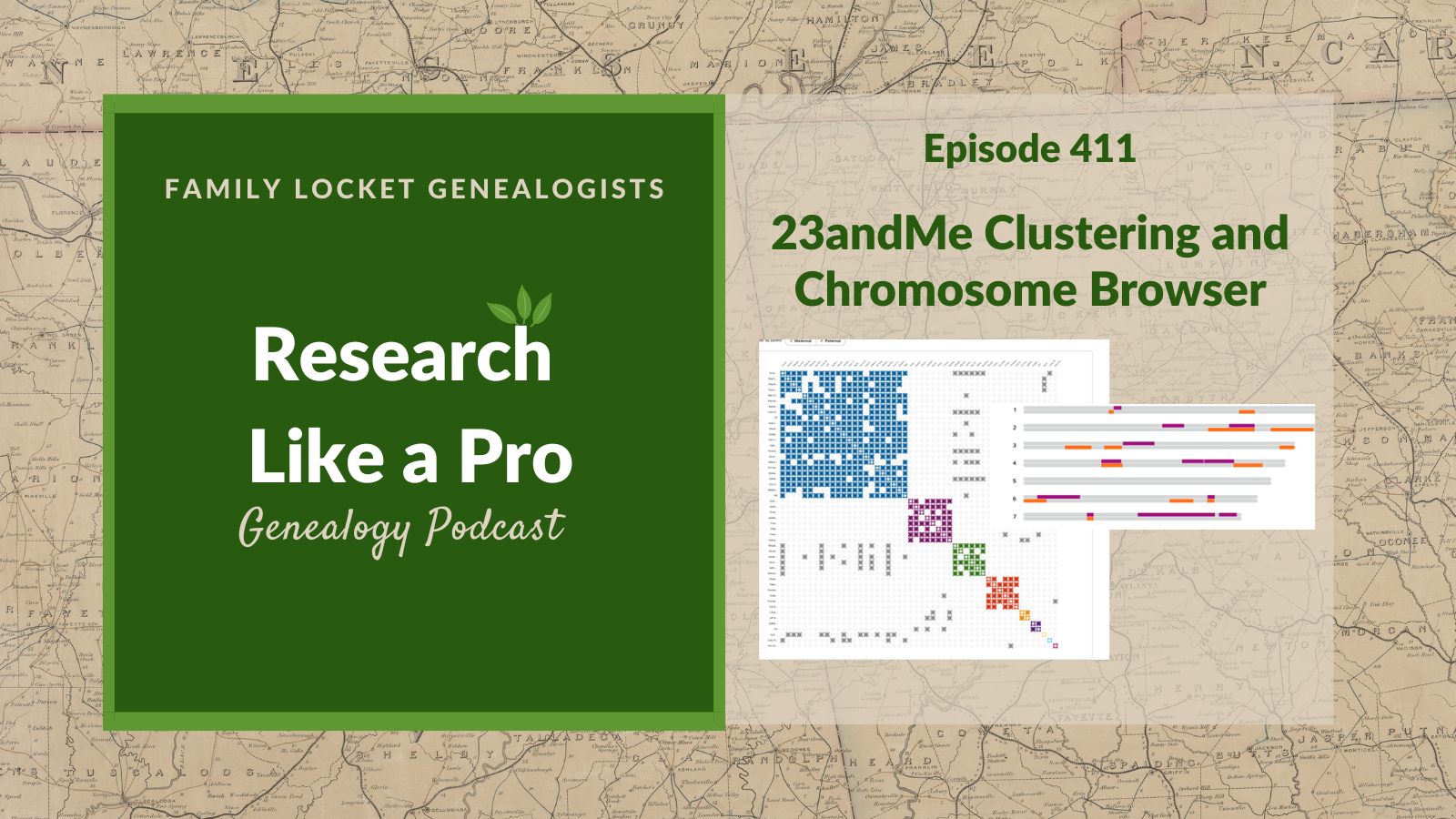
This episode of the Research Like a Pro Genealogy podcast focuses on the latest updates from 23andMe: the new DNA Relatives Clustering feature and the return of the chromosome browser. Nicole introduces the topic by explaining that both features are now available for premium users, stating that this move, while potentially disappointing for some, is necessary to support the profitability of DNA testing companies. Diana discusses the brand new DNA Relatives Clustering feature, clarifying that it organizes DNA matches into groups who share with each other, suggesting they descend from the same common ancestors. Listeners learn that a key benefit of this clustering is being able to hover over an intersecting cell to see the shared centimorgans between two people in the cluster. Nicole adds that users can also download their cluster results to a CSV file, which shows how much individuals share with each other. Diana illustrates the process by giving an example of creating a cluster from a DNA match named Susan, which involves using the “Cluster relatives in common” button.
The hosts then shift their focus to the Advanced DNA Comparison Tool, also known as the chromosome browser. Diana clarifies that the tool is still useful for triangulation, allowing users to compare one match to another match. She explains that the main difference is that matches must be a “connection” with the test-taker to be placed in the primary comparison spot. Nicole notes a benefit where users can see if DNA overlaps in the “Relatives in Common” list, and clicking on that overlap takes them directly to the chromosome browser. Listeners gain a detailed understanding of how to use these new tools to advance their genetic genealogy research at 23andMe.
This summary was generated by Google Gemini.
Transcript
Nicole (0s):
This is Research Like a Pro episode 411: 23andMe Clustering and Chromosome Browser. Welcome to Research Like a Pro a Genealogy Podcast about taking your research to the next level, hosted by Nicole Dyer and Diana Elder accredited genealogy professional. Diana and Nicole are the mother-daughter team at FamilyLocket.com and the authors of Research Like a Pro A Genealogist’s Guide. With Robin Wirthlin they also co-authored the companion volume, Research Like a Pro with DNA. Join Diana and Nicole as they discuss how to stay organized, make progress in their research and solve difficult cases. Let’s go.
Nicole (41s):
This episode is sponsored by Newspapers.com. Hi everyone. Welcome to Research Like a Pro.
Diana (48s):
Hi Nicole. How are you doing today?
Nicole (51s):
I’m doing well. How about you?
Diana (53s):
I am also doing well and excited to be on the podcast again talking with you about some fun things that we’ve been trying out.
Nicole (1m 1s):
Yeah, we’re recording this a little bit early because this week we’re all headed to the National Genealogical Society Conference, so that’s fun to look forward to.
Diana (1m 11s):
Exactly. Well, what have you been working on?
Nicole (1m 13s):
Well, I’ve been getting one of my talks ready for the conference and it’s about Humphrey Arnold’s descendants and he was a colonial Virginian and the talk is about the migration of his descendants and I wanted to make a map showing all of their migration routes because I traced so many DNA test takers forward from him and showed, you know, how they all match each other and that builds a case for the mother of Barsheba Tharp, who is a great-grandchild of Humphrey Arnold. Well, I’ve been just experimenting with all different fun things to make this map. I tried making one with Chat GPTs image generator and of course all of the states were mostly good, but then it mislabeled Arkansas as Mississippi and had two Mississippi.
Nicole (1m 60s):
It was just so funny to see all of the little things that it can’t quite get right on a map. So while the map was really pretty and I love it, it had some issues and I’ve been working on getting those edited and Chat GPT actually does a pretty good job of editing those and fixing them, but it’s just taking a while. Well, I also tried another tool called Palladio, and I’m not sure if that’s how you say it, by Stanford, that can map things, and Gemini was helping me prepare my CSV file to map out all these migration routes and that worked pretty well too. So it’s been fun trying out some different things to visualize this migration of Humphrey Arnold’s descendants.
Diana (2m 37s):
Oh, that’s so neat. And I love that you’re finding some new tools. There’s so many AI tools out there that you can try out. And even just using the main chatbots, you know, like Chat GPT, there’s so many things you can do, but it’s a little tricky, just like you said, figuring it all out so.
Nicole (2m 54s):
Yeah, the Palladio one wasn’t an AI tool, but I was using the AI to help me find it and then generate the spreadsheet for it, which reminds me of how I used Lucidchart, you know, to learn more about how to use it and and learning about what type of spreadsheet I needed to upload to it to get it to generate things from a certain template. So it’s been neat to use AI kind of as a technology advisor in that way instead of always just using AI to do the task, but having it teach me what tool would do it best and help me, me prepare my documents to use the tool.
Diana (3m 27s):
Oh, that’s a great use of it. I love that. Well that’s so fun. Let’s do some announcements. Our Research Like a Pro webinar series for 2026 continues on Tuesday June 16th at 11:00 AM Mountain Time. Our presenter will be Barb Groth and her topic is, Geography, Negative Evidence and Autosomal DNA Reveal a Child Bride’s Father. Mildred was first located in Newton, Texas when she married Cornelius Kelley on 18 April 1900. No direct evidence ties her to either the date and place of her birth or the name of her father. Negative and indirect evidence combined with DNA autosomal matches prove that Mildred Katherine Kelley, born in October of 1882, was the daughter of William Wilton Beasley.
Diana (4m 16s):
So the topics that Barbara will be covering are Texas, Georgia, same name individuals, legal context, probate records, negative census search, voter registration, tax rules, and ancestry DNA matches. So, so many good things in there. A little bit about Barb. Barb is an Accredited Genealogist in the Great Lakes region specializing in German-American families and unknown parentage cases, a graduate of A graduate of ProGen 63, Research Like a Pro (RLP), and Research Like a Pro with DNA, she combines expertise in genetic genealogy with thorough documentary analysis and strict adherence to the genealogy proof standard.
Diana (4m 57s):
Barb is the author of two books on family history preservation and has presented at RootsTech. Based in Pinedale, Wyoming, she continues her professional development through enrollment in Investigative Genetic Genealogy at Ramapo College and is working towards certification as an IGG. Well, we’re excited to learn from Barb and as you can see, she’s very well qualified to teach us. Our next study group will be a Research Like a Pro that begins in August and registration for that is currently open. You can register or apply to be a peer group leader. The application is on our website and you get complimentary registration, you get to lead a small group of peers and it’s, it’s just a really neat experience to do that.
Diana (5m 41s):
So we welcome anyone who’d like to apply, be sure to join our newsletter that comes out each Monday with new blog posts, upcoming lectures, coupon codes that we might be offering. And we’re excited because this week when this podcast comes out, we are traveling to the National Genealogical Society Conference, which is being held in Fort Wayne, Indiana and we’re excited to go to the Allen County Public Library Genealogy Center and do some research there, see what books and journal articles are there that we perhaps couldn’t get anywhere else. So the theme of this conference is America at 250 and I am presenting two topics that are both hinging on court records and one is reconstructing female networks and the other is uncovering family stories.
Diana (6m 33s):
So I am looking forward to presenting those. And Nicole’s topics are Decoding America’s Past Using AI to Understand 250 Years of Historical Terminology and from Colonial Virginia to Tennessee, DNA Reveals Bathsheba Tharp’s Ancestry in America’s Westward Migration. And then Deciphering Script and Scroll: a Practical Workshop for Early Handwriting. So you can see we’ll be busy teaching there as well as attending classes and hope hopefully meeting lots of new friends and connecting with old friends.
Nicole (7m 8s):
Yay, it’s gonna be such a fun week. Well, today we’re going to talk about 23andMe and two of their new features, the clustering feature and the chromosome browser. And back in March at the very beginning of the month, 23andMe rolled out a new clustering feature and at first it was available for free and it was just kind of quietly rolled out. And then we went to RootsTech and it was officially announced and it was only for premium users. And so that was like great but disappointing for those who weren’t premium users. And then they also brought back the chromosome browser around that same time also just for premium users.
Nicole (7m 47s):
And so some people might complain that these features are great but only for premium users. So it’s not great for everyone and I can definitely see how that’s disappointing. But with the company’s recent bankruptcy, I can also understand the need for DNA businesses to be profitable and the testing cost is not prohibitive, it’s very affordable, which makes it great for anyone who wants to try DNA testing. And then for those who use the advanced features and want to support DNA testing companies and help them stay afloat, the premium plan provides the avenue. So I’m glad to see DNA testing companies developing tools to help us in our genetic genealogy, even if it means we need to pay a little more for them.
Nicole (8m 31s):
And I’ve often heard genetic Genealogists say that they would be happy to pay a little more for the tools that make their jobs easier. And I know it’s sometimes feels different for those who aren’t professional Genealogists or who aren’t like advanced genetic Genealogists that it feels like you know, they’re having to pay extra for all of those little features and they’re already paying so much for their subscriptions. So it definitely is challenging to decide what’s worthwhile for you. So hopefully this episode will help you decide if you do want to get the premium 23andMe so that you can use these features.
Diana (9m 8s):
Well, I think one of the challenges with 23andMe in the past was that many people don’t respond to messages, they don’t have trees and it’s really difficult to figure out how they connect to you and what lines they might be on in your family tree. But with DNA relatives new clustering tool, it actually is helping me to figure out some of these people, which is really exciting. So even though clustering at 23andMe is brand new, it’s not a new concept in our genetic genealogy world. Cluster charts show DNA matches in our relatives list who share with each other and many people who share with many other people on the same group will form a cluster and probably descend from the same common ancestors, or at least the same line of your family.
Diana (9m 58s):
So a really nice feature of 23andMe’s clustering is you can see how much each person shares with each other person in the cluster by just hovering over the intersecting cell. So this is much easier than maybe some in ways in the past that were a little clunky. And so you could easily build yourself a matrix here, you can just really get an idea of whether it’s a little bit of DNA or a lot. So these new clusters are just really neat. There is an article that you can checkout “How to use DNA Relatives Clustering at 23andMe”. So it’s written by 23andMe, it’s part of their customer care and if you’re interested in trying this out, you can certainly go there and get all the ins and outs straight from the company.
Nicole (10m 46s):
Yeah, just looking at that help page or customer care page, it has some great categories. It talks about what is this tool, what can I learn from using this tool, how do I read the clustering results and customizing the clusters. So it has kind of a lot here and it’s really great. So if you want to dive in a little bit deeper to that, definitely go to the customer care or help article. One really great benefit of the 23andMe clustering is that you can download your cluster results to a CSV file and the file if you open it up in Excel or whatever you use for your spreadsheet, that file then shows how much individuals share with each other, which is really neat.
Nicole (11m 28s):
So looking at that, it’s instead of colored cells when you open it in Excel in each cell, it just has a number showing the amount of centimorgans shared between those individuals. So in the example that I have shared in the blog post that goes along with this episode, you can see that the first two people in the top left share 753 centimorgans with each other. So they’re probably a lot closer cousins than most of the others. Then going down the column, the next person shares 65 centimorgans with that person and then 68 and 25 and you can just kind of look through the cluster and see, oh, and then there’s someone who shares 1987 centimorgans, so a much closer family relationship.
Nicole (12m 11s):
And then you have some people who share, you know, 57 or 85. And so it’s kind of a, an a really interesting way to look at your clustering results in this downloaded CSV file to be able to see how much they all share with each other in a spreadsheet format.
Diana (12m 33s):
I agree it’s similar to how we use in Ancestry, you know, the pro tools of shared matches where we can see how much people share with each other and then we can say, oh, it’s a brother, it’s a sister, it’s a child. And those are specially helpful if you figured out who someone is, then it will help you to identify, you know, more of your matches. So, you know all these little tricks to try to figure out who our matches are, which is what we really want to know. Well let’s do a little bit of an example. I was playing around with 23andMe and I clicked on filter by your latest matches. I get emails that, you know, so many people have joined 23andMe. And so one day I thought, okay, I’m just gonna go try to connect with each one of these new people.
Diana (13m 18s):
And when you connect with someone and they actually connect back with you, then you can look at their DNA and do a lot more with it. And so I had found a match named Susan and she connected with me. She had been active that very day and that was really nice. And so from there I was able to start learning a little bit more about with her because she connected with me. I could still looked at cluster relatives in common, but I really needed to connect with her to compare and see how much DNA we shared with each other. One of my goals is always to paint matches on my DNA Painter chromosome map.
Diana (14m 4s):
And unless someone connects with you, you can’t see the specifics of where your start and stop points are on the chromosome that you match. And that’s how I use it to figure out family lines. So I had clicked the Cluster Relatives in Common and had a pretty nice group of matches. I had a really large blue group and then I had a little smaller pink group and then I had a whole bunch of just little tiny clusters where only two people were sharing all the way through and so those weren’t as useful, but I thought, okay, with this really large blue group I should be able to figure out what line that’s on.
Diana (14m 45s):
And so then I went to the page where it lets you compare. And I found that I had, you know, a decent amount of DNA we had shared, we had three chromosomes in common, one was 15 centimorgans, one was only three and one was 9 centimorgans. And so I took that information for this match and I copied that and I painted a new match over in DNA Painter and I was able to see that she fits on my Harris line. I had two previous people who I had put in there on that chromosome, it was on chromosome nine and I knew it was the paternal side and she matched with one of my first cousins, which would be my Harris and my Shults lines.
Diana (15m 35s):
And then I had another match who I had previously discovered was a Harris match. So now I know that this cluster is a bunch of Harris cousins and looking at some of the others I saw that we all match on the same segment in chromosome nine. So that was nice to be able to identify a lot of people on my match list, at least from one of my great-grandparent groups, rather than just having the huge whole paternal lines to wonder about.
Nicole (16m 6s):
Yay, that’s so great. I love that when you were talking about connections and sharing and permissions, I think that part is a little confusing sometimes with 23andMe. So looking at the 23andMe customer care page called How to Start and Stop 23andMe Sharing, it does talk about how you can connect using the your connections feature, but there’s a lot of people in our DNA matches list that I know we haven’t connected with. So I found the thing I was looking for which is “Open Sharing” and that’s what we’ve selected for your results mom, I’m pretty sure, is open sharing, and what it says in the customer care article is: “Open Sharing in the DNA Relatives feature make select information including your full profile name, overlapping DNA segments, and ancestry reports like your ethnicity available to your matches in DNA relatives without an additional sharing request.
Nicole (17m 2s):
If you are participating in open sharing, you will be able to easily compare ancestry information with other DNA relatives’ matches who are also participating in open sharing. You can identify matches who are participating in open sharing by the purple dot in the sharing column.” So that is important to realize. And so some of our matches are not doing that and if they’re not then we do have to click on the request connection button or whatever it’s called so that we can connect with them and see the overlapping segments like you did with Susan. But some of them we can see automatically just due to them being opted into open sharing.
Diana (17m 40s):
That’s really good to know because honestly I don’t remember everyone who I have connected with and it’s nice to know that there are some people that just said connected or did the open sharing. So that’s awesome. And I would just note that you can filter your DNA match list on 23andMe by Connections so you can filter for all the people you are connected with and that can help you just to see automatically this whole list of people that you can work with. So that’s a helpful item that they’ve given you there.
Nicole (18m 13s):
Well I did wanna say also that since I had mentioned the downloaded CSV spreadsheet view of the clustering, you might be wondering, well how is that different from what you can see in the Relatives in Common or shared matches list? And one thing that is pretty different is that it shows you the percentage of DNA shared in the Relatives in Common list rather than the number of centimorgans, which is different than how Ancestry does it. And so for me personally, I would rather see the number of centimorgans shared, but I think they do this for consistency because not everyone has opted into open sharing. And so you have to click connect to view the DNA overlap.
Nicole (18m 57s):
And so for those who are not open sharing, you can only see the percentage of DNA that they share and on the match page and in the Relatives in Common list. But it does show you how much a match shares with you and with the person whose page you’re on, just like it does in Ancestry Pro Tools. So that’s nice, but it’s just I think even nicer when you download it to the spreadsheet, the cluster data and then you can see in centimorgans how much everyone is sharing with each other rather than in percentages. So that’s pretty nice and but it’s also nice to see it in the Relatives in Common lists. They’re both good. I just like the clustering a little better.
Nicole (19m 38s):
It’s just a little bit more information as far as like granularity and giving you the exact number of centimorgans people are sharing.
Diana (19m 47s):
It’s a visual and often that’s just really helpful to see things. I agree, I like it like that.
Nicole (19m 53s):
I guess one question I have is, are the people who are not open sharing included in the clustering?
Diana (20m 2s):
Hmm, that’s a good point. There’s a few things to explore with these.
Nicole (20m 7s):
Oh, actually have the answer already. I found one. So yes, the people who you haven’t connected with, they still are in the cluster, so that’s nice. You can see the number of centimorgans they share.
Diana (20m 22s):
Well that is great to know.
Nicole (20m 23s):
Alright, well let’s have a word from our Sponsor, as flowers bloom and the days get warmer, why not breathe new life into our family history research.
Nicole (21m 32s):
Newspapers.com is the perfect companion for Genealogists at any level looking to go beyond names and dates. With access to over a billion pages of historical newspapers, you can uncover fascinating stories about your ancestors that don’t show up in typical records. Picture finding a heartfelt obituary that introduces extended family, a local news article showcase casing your great-grandmother’s community role, or even a photo that captures a special moment from long ago. Little treasures that make their stories blossom before your eyes. Newspapers are packed with the everyday moments, announcements, celebrations, challenges that bring color and depth to the lives of those who came before you. These rich primary sources help you connect with your family’s past in a way that feels personal and meaningful. The search is easy and intuitive whether you’re looking by name, place, or time period, letting you uncover these hidden gems at your own pace, ready to brighten your research with stories that go beyond the usual. Visit newspapers.com/FamilyLocket today and enjoy 20% off a subscription. Let spring be the season you turn your family tree into a lively family story.
Diana (21m 32s):
Well now let’s talk about the chromosome browser. So this advanced DNA comparison tool at 23andMe does still allow you to compare one match to another match as it did before. So it’s extremely useful for triangulation. There is just a little bit of confusion out there on this, but the difference is that matches have to be a connection with you or you can’t put them in the main spot to compare where the test taker usually is. So again, it comes back to the connections and how much we can do with a person if we are not connected with them. And so we really like and want to have this advanced DNA comparison tool available because that’s how we see the specifics, and we need the specifics of the DNA so that we can add them to our chromosome map.
Diana (22m 25s):
So a good reason just to try to connect with people. So something fun that I just discovered, you know as I’m exploring 23andMe, is I found a gentleman who shares a really sizable amount of DNA on the X chromosome, which is super interesting because that can help you really hone in on what side of the family that they could be connected with. And doing the clustering, I found a whole bunch of other people. So now I have this huge cluster of people that apparently are sharing on the same cluster or the same X chromosome. So this is giving me something fun to look at.
Diana (23m 6s):
You know, every time we look at our DNA match list, we discover new things to explore. So that is one of the things we haven’t noted here is that 23andMe will show your matches on the X chromosome.
Nicole (23m 18s):
Yeah. And that’s a big benefit. You know, MyHeritage doesn’t show that. So it’s nice to be able to see X matches at 23andMe as well as FamilyTree DNA.
Diana (23m 30s):
Right,
Nicole (23m 31s):
Right, and GEDMatch too. Of course GEDMatch shows you the X chromosome as well. Alright, well there is a blog article called Decoding Your Connections Introducing Advanced DNA Comparison. And this came out on March 4th, 2026 by Samantha Esselmann, PhD and it kind of talks about the way that the advanced DNA comparison works and you know who you’re allowed to compare between and how you can find triangulation with it. It talks about how it’s powered by the HybridIBD technology and it’s not just a simple unlock of old software.
Nicole (24m 11s):
This is a re-reintroduction of a tool that was taken away after the security breach. And so some people were just waiting for it to come back, but it says that they’ve rebuilt the engine using their enhanced HybridIBD technology. And it combine combines two different types of IBD analysis to detect shared segments with higher precision than ever before. And this is helpful for correctly identifying distant relatives. And so this is exciting. Longer segments usually indicate a more recent common ancestor and a lot of small choppy segments suggest more distant population wide sharing. So it’s good to realize the, the more advanced technology will make it more precise for identifying close relationships rather than a lot of that like population segment, like more distant type of relationship.
Nicole (25m 5s):
And they also mentioned that they’ve redesigned this to have a more security first architecture so that you’re more in control of what you share. And so that’s part of why it’s not as flexible as it was in the past where you could put anyone in the main spot for comparison. Now you have to be a connection with someone in order for them to see all of the segments you share with the other people in your match list. So you, and this isn’t not including everyone who’s in open sharing, so it’s only people who’ve who clicked on like actually connecting with you, I believe. So you can put people who are in open sharing into the comparison spot with yourself in the main spot and you can see the overlapping segments.
Nicole (25m 54s):
But to see triangulation you have to put, let’s say your A, your match A, and then you have match B that you overlap with and you have match C that you overlap with all in the same spot. But to truly triangulate, you have to put match B in the main spot and match C in the other spot to see if they also share in that exact same spot. And a lot of the time they do and that’s true triangulation, but there’s no way to see that unless, you know, there’s no way to really confirm or know that for sure unless you can put one of them in the main spot. So you have to connect with them. So that gives more security for everyone on 23andMe, but just makes it take that extra step, which isn’t a bad thing, but it is giving more safeguards and security for everyone so that they are more aware of who can see that information.
Nicole (26m 41s):
And so that’s good in a way, although it is a a little bit more annoying for us,
Diana (26m 48s):
We always want to just to be able to see everything and do everything we want to do with no restrictions. But you know, we just do the best we can and there are plenty of things we can do in case, you know, in the case that someone isn’t sharing or connecting with us, we just work with someone who is
Nicole (27m 5s):
Right.
Diana (27m 5s):
Yeah. And the great thing is with Relatives in Common and the clustering, if someone is not connecting with you, hopefully someone in that cluster is connecting with you and you can start to learn more. So that does give you a really quick way to find someone who can perhaps give you more information.
Nicole (27m 28s):
Yeah, that’s so true. Well, we already mentioned this a little bit, but now that the advanced DNA comparison or the chromosome browser is back, you can now see the column in the Relatives in Common or shared matches list called DNA overlap. And this is where you can see segments that overlap between you and the shared match. So you can click compare and then it takes you to the chromosome browser and then you can see those exact segments. And I, I’m not remembering for sure exactly how this used to work, but before the security breach and before this was taken away, but now this is the way that you have to do it in order to see the exact start and stop points and to be able to map it to the chromosome browser, you have to click compare to view that chromosome browser.
Nicole (28m 23s):
Or you can go back up to the your genetic relationship section of the match page and click compare with more relatives. And that also takes you to the advanced DNA comparison or chromosome browser, which can give you the segment data. So it’s a little bit more of a roundabout way to see it all, but it’s still there and you can still see it.
Diana (28m 43s):
Well that’s good and it’s great that this tool and this website is back and giving us some good things because there are a lot of people on 23andMe, we have a lot of matches there and they could be holding valuable information for us on our family tree. So you know, depending on our research objective, how much we’re doing with genetic genealogy, we may want to upgrade and have access to all of these tools. I think it just depends on your situation and what goal you have with your DNA. Well thanks everyone for listening. It’s been fun to talk about these new tools at 23andMe and hopefully it gives you some ideas about whether you want to do the upgrade or if you already have what you can do with it.
Diana (29m 28s):
So thanks for listening and we will talk to you next time.
Nicole (29m 33s):
Bye-bye.
Diana (29m 33s):
Bye-bye.
Nicole (29m 31s):
Thank you for listening. We hope that something you heard today will help you make progress in your research. If you want to learn more, purchase our books, Research Like a Pro and Research Like a Pro with DNA on Amazon.com and other booksellers. You can also register for our online courses or study groups of the same names. Learn more at FamilyLocket.com/services. To share your progress and ask questions, join our private Facebook group by sending us your book receipt or joining our courses to get updates in your email inbox each Monday, subscribe to our newsletter at FamilyLocket.com/newsletter. Please subscribe, rate and review our podcast. We read each review and are so thankful for them. We hope you’ll start now to Research Like a Pro.
Links
23andMe New Clustering Feature and Returning Chromosome Browser – https://familylocket.com/23andme-new-clustering-feature-and-returning-chromosome-browser/
23andMe Customer Care Articles and blog posts:
How to Use DNA Relatives Clustering at 23andMe – https://customercare.23andme.com/hc/en-us/articles/38509301730839-How-to-Use-DNA-Relatives-Clustering-at-23andMe
How to Start and Stop 23andMe Sharing https://customercare.23andme.com/hc/en-us/articles/212871747-How-to-Start-and-Stop-23andMe-Sharing
Decoding Your Connections: Introducing Advanced DNA Comparison – https://blog.23andme.com/articles/reintroducing-advanced-dna-comparison
Sponsor – Newspapers.com
For listeners of this podcast, Newspapers.com is offering new subscribers 20% off a Publisher Extra subscription so you can start exploring today. Just use the code “FamilyLocket” at checkout.
Research Like a Pro Resources
Airtable Universe – Nicole’s Airtable Templates – https://www.airtable.com/universe/creator/usrsBSDhwHyLNnP4O/nicole-dyer
Airtable Research Logs Quick Reference – by Nicole Dyer – https://familylocket.com/product-tag/airtable/
Research Like a Pro: A Genealogist’s Guide book by Diana Elder with Nicole Dyer on Amazon.com – https://amzn.to/2x0ku3d
Research Like a Pro with AI Workbook – Second Edition (eBook) – https://familylocket.com/product/research-like-a-pro-with-ai-workbook-second-edition-ebook/
14-Day Research Like a Pro Challenge Workbook – digital – https://familylocket.com/product/14-day-research-like-a-pro-challenge-workbook-digital-only/ and spiral bound – https://familylocket.com/product/14-day-research-like-a-pro-challenge-workbook-spiral-bound/
Research Like a Pro Webinar Series – monthly case study webinars including documentary evidence and many with DNA evidence – https://familylocket.com/product-category/webinars/
Research Like a Pro eCourse – independent study course – https://familylocket.com/product/research-like-a-pro-e-course/
RLP Study Group – upcoming group and email notification list – https://familylocket.com/services/research-like-a-pro-study-group/
Research Like a Pro Institute Courses – https://familylocket.com/product-category/institute-course/
Research Like a Pro with DNA Resources
Research Like a Pro with DNA: A Genealogist’s Guide to Finding and Confirming Ancestors with DNA Evidence book by Diana Elder, Nicole Dyer, and Robin Wirthlin – https://amzn.to/3gn0hKx
Research Like a Pro with DNA eCourse – independent study course – https://familylocket.com/product/research-like-a-pro-with-dna-ecourse/
RLP with DNA Study Group – upcoming group and email notification list – https://familylocket.com/services/research-like-a-pro-with-dna-study-group/
Thank you
Thanks for listening! We hope that you will share your thoughts about our podcast and help us out by doing the following:
Write a review on iTunes or Apple Podcasts. If you leave a review, we will read it on the podcast and answer any questions that you bring up in your review. Thank you!
Leave a comment in the comment or question in the comment section below.
Share the episode on Twitter, Facebook, or Pinterest.
Subscribe on iTunes or your favorite podcast app.
Sign up for our newsletter to receive notifications of new episodes – https://familylocket.com/sign-up/
Check out this list of genealogy podcasts from Feedspot: Best Genealogy Podcasts – https://blog.feedspot.com/genealogy_podcasts/



Leave a Reply
Thanks for the note!