
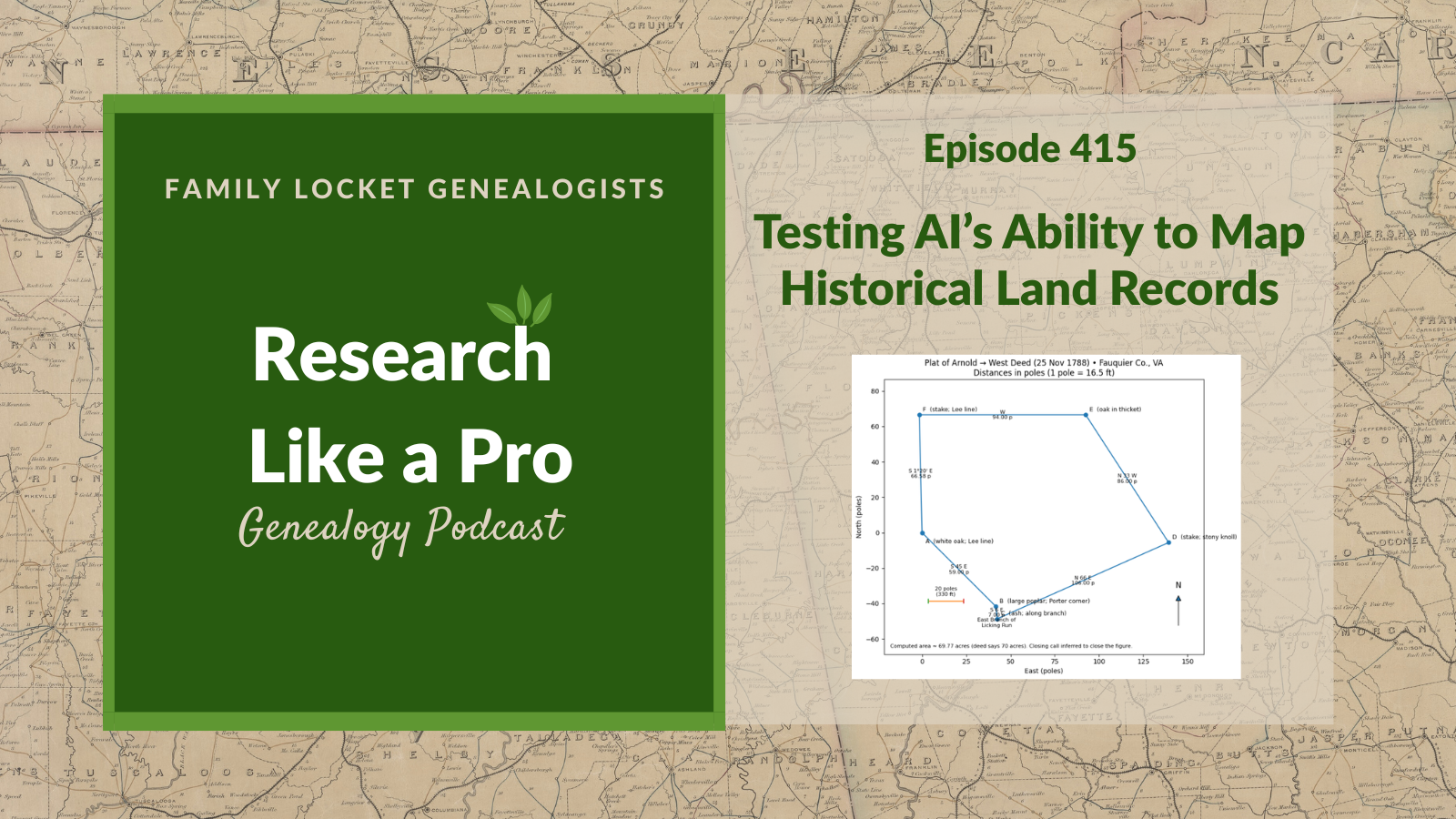
Diana Elder and Nicole Dyer examine the current capabilities of artificial intelligence for mapping historical land records. Nicole tests ChatGPT’s ability to convert a metes and bounds description from an 1788 Arnold-West deed into an accurate land plat drawing. She compares the AI-generated results against a verified plat she previously created using DeedMapper software.
Nicole experiments with several prompting strategies, including simple prompts, chain-of-thought, and meta-prompting. She discovers that while basic image generation struggles to create accurate diagrams, asking the AI to write and execute Python scripts yields technically correct representations. She also evaluates the newer “thinking” model, which autonomously uses logic and scripts to plot the land. Listeners learn that while AI serves as a helpful assistant for genealogy research, users need foundational knowledge in deed mapping to verify the accuracy of the results.
This summary was generated by Google Gemini.
Transcript
Nicole (1s):
This is Research Like a Pro episode 415: Testing AI’s Ability to Map Historical Land Records. Welcome to Research Like a Pro a Genealogy Podcast about taking your research to the next level, hosted by Nicole Dyer and Diana Elder accredited genealogy professional. Diana and Nicole are the mother-daughter team at FamilyLocket.com and the authors of Research Like a Pro A Genealogist’s Guide. With Robin Wirthlin they also co-authored the companion volume, Research Like a Pro with DNA. Join Diana and Nicole as they discuss how to stay organized, make progress in their research and solve difficult cases. Let’s go. This episode is sponsored by Newspapers.com.
Nicole (46s):
Hello, welcome to Research Like a Pro Everyone.
Diana (48s):
Hi Nicole, How are you doing today?
Nicole (51s):
Hey, I’m doing well. How about you?
Diana (54s):
I am doing well, as well. What are you working on these days?
Nicole (58s):
I’ve been working on a lot of research report review. I’ve been reading a bunch of really good reports from the DNA study group that we had and trying to give helpful feedback and it’s just been so fun to see all of the people using Banyan DNA to help with the analysis and see the different validation and hypothesis calculations that they’re doing. You know, which brother could it be that was the father and which one’s more likely and that kind of thing. The statistical analysis and it’s been cool to see how people are using AI to help them with different aspects of report writing, you know, editing sentences here and there and creating tables and that kind of thing.
Nicole (1m 42s):
So it’s been really interesting.
Diana (1m 44s):
Well that is so great and I do love reading reports to see how people learned and take, you know, taking what we teach and put that into into real work and making progress. So that is super neat.
Nicole (1m 58s):
For our announcements today we have our next webinar in the Research Like a Pro series by Jessica Morgan on July 18th and it’s titled The Roskell Case: Untangling Crossed Trees on FamilySearch. So this is about Robert Roskell born 1803 in Lancaster, England and he was listed on the FamilySearch tree with two sets of parents, three wives, and three sets of children. So Jessica’s presentation will go through the critical thinking used to untangle Robert from two other Robert Roskells and accurately document his family. The topics include England, FamilySearch, Same-name individuals, Lancashire, parish registers, England Census, English vital records, Bishops Transcripts.
Nicole (2m 47s):
A little bit about Jessica, Jessica Taylor Morgan is an Accredited Genealogist® who loves helping people discover their past. She worked as a professional Genealogist at Ancestry for nine years, helping both clients and Ancestry’s public relations team. She provided genealogy research for shows such as, who do you “Who Do You Think You Are?”, “Long Lost Family,” and “A New Leaf,”, as well as the award-winning Sundance film “Railroad Ties.” A graduate in medieval history, she specializes in U.K., Irish, Scottish, U.S., and immigration research. She is also a professional writer and loves creating stories that help people engage and explore their family tree.
Nicole (3m 30s):
So we’re really looking forward to having Jessica share with us her research on this case. And it sounds like a really interesting untangling multiple merged identities case. The next study group will be this fall, Research Like a Pro, and it will focus on documentary research. This will be the 12th RLP study group and it begins August 26th, meets weekly for nine lessons with a few break weeks in there so it does, it’ll span 13 total weeks and registration has already begun. And the early bird price, we have extended that to go until July 2nd. So make sure you register before then so you can get the 375 deal instead of 400. If you want to be a peer group leader, just apply on our website or email us and let us know.
Nicole (4m 12s):
Make sure to join our newsletter that comes out every Monday to get notices of our new blog posts and podcast episodes, videos and coupons. And we are going to be at the Virtual Professional Management Conference by the Association of Professional Genealogists, so we hope to see you there virtually on October 14th through the 17th of 2026 this year. And so Diana is teaching a few different classes. One is about easy CRM Tool: Managing Client Projects and Contractors with Google Sheets and Airtable. Then her other class is actually a panel and it’s called From Concept to Classroom Genealogists Share how They’ve Built Courses that Teach and Inspire.
Nicole (4m 53s):
So that will be fun, too. And then I’m doing a panel on podcasting, Find Your Voice: Podcasting as a Path to Community, Clients and Credibility. Gotta love that alliteration there. And then my workshop will be called Airtable Meets AI Smarter Transcription and Research Logging. So I’m excited about that. Well today our topic is going to be about using AI to help map historical land records and I decided to see if ChatGPT could create a land plot drawing as well as deed mapper. So that was kind of my idea for coming into this experiment. I like to experiment with AI a lot and just kind of see what the tool is able to do.
Nicole (5m 38s):
And so about a year or two ago I had asked ChatGPT to convert a metes and bounds land description into a land plat drawing and it was not able to do so correctly, but recently I tried again and the results were astounding. So eventually I was able to get it to do the the land plat drawing. So I’ll share how I did that. And basically I compared three different scenarios and this really highlights the fact that there is a difference in the model that you choose, the prompt that you use and what mode you choose. So thinking versus non-thinking, and so forth. So the three scenarios were first ChatGPT 5.2 Auto with a short, simple prompt.
Nicole (6m 23s):
And then I tried again with the same model ChatGPT 5.2 Auto, which both of those times it defaulted to the Instant rather than the Thinking model. So auto was when it would choose the which model you needed. And so when I did a longer meta and chain-of-thought prompt, how did that turn out? And then finally comparing just ChatGPT 5.2 Thinking with a short, simple prompt. So we’ll go through how all those worked.
Diana (6m 53s):
Okay, so let’s start out with the actual text of the deed. And so we have the Arnold-West deed dated 25 November, 1788. And the neat thing about this whole test case is that Nicole had already platted this using DeedMapper software a year or two ago and having that as her baseline then she could compare the AI plat drawing to a correct version. So I’m going to read this and we will just read the first part, we’ll skip a lot of boilerplate and then I will read the actual description. So it starts off with this indenture made this the 25th day of November in the year of our Lord 1788 bBetween Humphrey Arnold of the County of Fauquier and State of Virginia and Ann his wife of the one part and John West of the County and state aforesaid of the other part.
Diana (8m 37s):
Okay, now let’s skip to the description. Beginning at a white oak in the line of Richard H. Lees land running thence so 45 E 59 poles to a large poplar standing on the east branch of Licking run corner to Samuel Porter thence down said branch with said Porter So 6 E 7 poles to an Ash thence with the said Porter No 66 E 106 poles to a stake on a stony nole in an old field thence no 33 W 86 poles to an hole oak in a thicket then west 94 poles to a stake in the aforesaid Lees line thence with the said Lees line to the beginning containing seventy acres to the same more or less it being apart of a larger tract of land formerly by the property of Thomas Bunbery and Elizbaeth Bunberry with all houses holdings orchards woods underwoods, trees, ways, water and water courses, So this was so fun. I loved all those descriptions, the white oak and the stony knoll and the ash and the whole oak and this is such a classic metes and bounds. So fun.
Nicole (9m 16s):
Yeah, it kinda makes me wonder what that whole oak, is it supposed to be holy oak or is it, what is that and did I transcribe that correctly? I dunno,
Diana (9m 25s):
Is it spelled HOLE? Yeah, I Don dunno,
Nicole (9m 29s):
That is a funny one. Yeah, well if you’re wondering how much this land cost, it was 60 pounds current money of Virginia. So they were still kinda using, and this was in 1788, so they were still using British money type of thing. Okay. So I used DeedMapper 4.2 and entered the calls into the software and just kind of figured my way, figured it out how to use the DeedMap program. It wasn’t very difficult to use but basically you, you have to put in all of the things that Diana just read and what was missing from the land description that she read was like the notation for degrees.
Nicole (10m 13s):
They usually leave that off. But 45 east, 59 poles is actually I think 45 degrees east, 59 poles kind of telling the direction and stuff. So you can tell I’m not really an expert at land platting, but I was able to use DeedMapper to accomplish the deed mapping and create the land plat by putting all this information in in kind of like a form within DeedMapper that tells you what to put in. And so the output that DeedMapper created, you can look at my blog post that goes along with this podcast episode to see the image of this, but basically it has like pink lines and at each corner there’s like a little dot and each one of the corners has the description from the land description.
Nicole (11m 7s):
So in the land plot drawing it starts kind of the way it turned out looking was kind of like a, a house almost. The shape of it. Like I would probably look at that and say oh that’s a a Pentagon shape, but it actually has one little other side at the bottom.
Diana (11m 27s):
It’s kind of a squished house. It’s like Dorothy’s house got squished landed in Oz,
Nicole (11m 34s):
Right? Yeah because the last
Diana (11m 35s):
On the side. Okay. So it’s neat that you have a program that made this because I remember one of the first classes I took at a Family History Conference, it was at the Brigham Young University Family History Conference and it was taught by Jill Crandall and we platted and we had graph paper out and we had our pencils and protractors and we were doing the 80 degrees and so many little squares on the graph paper for the each pole. Anyway, it was so cool and we ended up with all these amazing little shapes and it was really actually very, very fun. So when I saw this diagram, the DeedMapper made, it just brought that all rushing back to me.
Diana (12m 17s):
So let’s see what happens when ChatGPT 5.2 Auto did this. And so Nicole pasted that whole transcription that I read into this model 5.2 Auto and this model uses the prompt to decide if the user needs a fast versus a thinking model and other features. And I guess it didn’t know anything about land plotting ’cause it chose fast model and quickly used an image generator to draw a plat. Well the plat is quite lovely but is absolutely incorrect. It has historical items, it has a picture of the oaks and the whole oak actually is just a picture of a tree, as is the beginning white oak and it has the licking run, which it interpreted as being a little creek or little river, which is cool.
Diana (13m 7s):
So it’s actually very beautiful but it, the dimensions are not quite right. Interestingly it has the basic shape, but instead of having a house that’s leading to the left and a little squished now it’s really squished. It’s like the whole thing is just squished down. Comparing it is very interesting. It labeled, you know that this was supposed to be north 33 degrees, west 86 poles. It labeled each one of the little lines. But yeah, it was comparing it, it didn’t do a great job. It would be fun for just comparing or a pretty picture, but it’s not accurate.
Nicole (13m 48s):
Yeah, it’s so funny that it just created an image rather than like trying to create like a technical drawing, like a diagram type of thing. I think that’s what I expected. But then the drawing, you know the, sorry, the image that it generated was so pretty that I was like oh this is fun. But you know, examining it is just so artsy and inaccurate.
Diana (14m 16s):
Right, right. So interesting. Well let’s have a word from our sponsor for a minute. Newspapers.com is the perfect companion for Genealogists at any level looking to go beyond names and dates. b. With access to over a billion pages of historical newspapers, you can uncover fascinating stories about your ancestors that don’t show up in typical records.
Diana (15m 33s):
Picture finding a heartfelt obituary that introduces extended family, a local news article showcasing your great-grandmother’s community role, or even a photo that captures a special moment from long ago—little treasures that make their stories blossom before your eyes. c. Newspapers are packed with the everyday moments—announcements, celebrations, challenges—that bring color and depth to the lives of those who came before you. These rich, primary sources help you connect with your family’s past in a way that feels personal and meaningful. The search is easy and intuitive, whether you’re looking by name, place, or time period, letting you uncover those hidden gems at your own pace. Ready to brighten your research with stories that go beyond the usual? Visit Newspapers.com/FamilyLocket today and enjoy 20% off a subscription. Let this be the season you turn your family tree into a lively family story!
Nicole (15m 34s):
Alright, well let’s see what the next scenario produced. And I do have to say here that at the time that I did this experiment, ChatGPT was on model 5.2 and we’re now at 5.5 at the time of recording this on June 10th. And so this was just a little different. So back then, February of 2026 ChatGPT had this thing called Auto where it would select whether to use instant response or thinking before responding. And so that’s what I was trying out was like would it know to select thinking or you know, what would it select? And it kind of failed on that test. So I think that’s probably why they don’t have it do that anymore.
Nicole (16m 16s):
Like now in when I go into ChatGPT I see that the model is the latest model is 5.5 and I can choose Instant or Thinking in the dropdown. So that’s interesting that it doesn’t have the auto anymore, auto select anymore. Well with the second attempt I tried to use ChatGPT 5.2 Auto again and it selected Instant. So it’s basically just without the Thinking, and I used a longer prompt because I knew this task was challenging. So I tried a couple strategies to help get better results and so I tried the chain-of-thought prompting and that’s kind of one that I learned early on in my AI education and that’s where you give the chatbot a lot of questions and prompts leading up to the challenging task to get it to think about what it needs to know before doing the task.
Nicole (17m 13s):
And it kind of puts all of the information that it needs to do in its short-term memory there. And the other strategy is called meta prompting and that’s where you ask the chatbot to write a detailed prompt describing what needs to be done for a challenging task and then you give that prompt back to the AI and tell it to do the task. So you’re basically getting AI to create a prompt for itself. And so if struggling to write a detailed enough prompt for something, then AI can help you write the prompt that you will then give back to it. So using those two ideas, I used a series of prompts and gave those to ChatGPT Instant to incorporate the strategies.
Nicole (17m 55s):
So the first thing I said was what information would a Genealogist and expert in land records in Virginia need to know about metes and bounds and land platting from a description and a deed to be able to draw a land plat correctly. And so after that it gave a whole bunch of information about all the things you need to learn about in order to draw a land plat. And as I reviewed it, it seemed really good, good information, correct and from credible sources. So then I pasted the deed that I had transcribed including the land description and said, extract what you need to draw the land plot.
Nicole (18m 39s):
And so then it went ahead and like got out all the calls and the boundaries and the directions and then I said, write a detailed prompt for how to draw this land plot. So then it started writing like instructions for how to do it and then it wasn’t really specifically focused on AI writing like a prompt for AI, so I told it now rewrite this prompt so that it is focused on giving it to an AI tool, a prompt for an AI tool to draw the land plat. So then I got a little bit of a better prompt, then I told it to follow that prompt and generate an image of the land plat drawing.
Nicole (19m 19s):
So that was interesting because my error in that prompt of saying generate an image gave me another bad result because I didn’t say create or draw, I said generate an image and generate an image is definitely going to activate the part of ChatGPT that uses its image generator to create an AI image where instead of like creating a diagram through coding or you know creating something another way, it uses the like diffusion method to guess what the pixels should be in order to make it look like other images.
Nicole (20m 0s):
So it’s generating an image and not doing all of the technical steps that I just had it go through. And so while the drawing was a lot closer to the correct shape and everything, it was still incorrect and it was beautiful again, like it looked like an old map that someone had hand drawn and had a picture of the creek and some of the, you know, the stakes and the pictures of the ash tree and the white oak. It had all of that but it still wasn’t technically correct and it had several errors in it
Diana (20m 37s):
And the trees were no longer green. Trees were just brown and the river was brown, the other one was prettier true and it didn’t have the whole oak. Oh yeah, it does have the whole oak still and
Nicole (20m 47s):
A thicket
Diana (20m 49s):
And it still looks like a very squished house.
Nicole (20m 51s):
Yes. So the house is a little bit, it still looks more so this one looks more like a house, but it’s real. It is squished, you’re right. So then after realizing my mistake for saying generate an image instead of draw the land plat, I decided to try a different tact. And throughout the conversation, ChatGPT had been suggesting different things that it could do with the data it extracted from the deed. And so at one point it said I can write a python script to plot this land plat. And so since generating an image was the wrong way to go about it and it wasn’t producing that technically correct land plat drawing that I wanted, I thought the Python coding option would be a great option.
Nicole (21m 37s):
And so my next prompt was write a Python plotting script and then run the script and create the drawing and then add full bearing labels. And the resulting land plot drawing was an accurate representation of the land description and it matched my DeedMapper drawing exactly and it was actually even better than DeedMapper I thought. I mean it had some issues at first, you know, just with like overlapping words over the lines and things. So it wasn’t as pretty, but it was so pretty to my eyes because it was accurate. So I was excited about that.
Diana (22m 15s):
Well the thing that I think is neat is that is like graph paper in the background. So it’s just like one that I would’ve drawn myself using graph paper and protractor. So that was kind of cool to see that. So that is amazing and it just makes us really realize that so much of the errors that AI produces for us are just user introduced or just not knowing how to work with the tool. So I think this is such a fun exercise. So after this, Nicole wondered if the thinking model would be able to do this chain-of-thought thinking process itself without her guidance.
Diana (22m 56s):
After all, she barely did anything in the che chain-of-thought, just simply directed it to think about drawing a deed before it drew the deed. And so she gave it the same prompt as she did before, the ChatGPT 5.2 Auto, draw a land plat drawing of this deed and then paste it in the deed transcription and the results were very good. So she opened this thinking or activity sidebar and it thought for one minute and 24 seconds, the Thinking revealed the thought process that involved converting bearings to coordinates with the Python script accumulating points based on the calculations from azimuth and distance and calculating the polygon area.
Diana (23m 37s):
And so that turned out to be nice and it was basically the same exact drawing. It doesn’t have the graph paper in the background, but it has the drawing and it doesn’t have overlapping lines. It actually is the best one, isn’t it?
Nicole (23m 54s):
Yeah, this one went really well. And the main difference is just selecting the Thinking model from the get-go. So instead of messing around with like Auto or Instant or the Fast options, just go straight to Thinking. And when ChatGPT 5.2 was using a Thinking model and spending some time to think about and plan and review what what it did and just basically thinking then it did so much better. And so this one shot prompt of just here’s a land description, draw a land plat, it was able to do so. And I notably, I did not say generate an image of a land plat drawing.
Nicole (24m 34s):
I said draw a land plat drawing of this deed. So I think it realized that it needed to use coding rather than generating an image. So if you’re wanting a technical drawing, do not say generate an image. And if you’re doing something that’s challenging, like plotting a land description, land plotting, then yeah, definitely turn on Thinking model. I think most of the time a Thinking model is best because you get less mistakes, you get less hallucinations and you get more reliable results.
Diana (25m 12s):
Well it’s been really fun to have you take us through this and to have the images on the blog posts, you can see all the different images as well as the drawings. So, so fun. I love this idea of exploring and experimenting with AI, especially as the models improve and so many different ways to use it. So good job.
Nicole (25m 34s):
Yeah, and one suggestion I would say with this is that, you know, sometimes we want AI to do the things that we don’t know how to do. But if you do that, how will you know if AI did it correctly? So what I suggest is that you take a class on mapping deeds, learn, or learn how to use deed mapper or even have AI teach you about it so that you can understand what needs to be done and then try mapping out your own deed and learn how to do it yourself. Then once you’ve learned how to do it, then you can more fully instruct AI how to do it and check out the results when they’re back, you know when they’re done so that you have the skills and abilities, but then the actual time that you would spend doing it, you can hand off to the AI tool.
Nicole (26m 20s):
And I think that applies to a lot of the things we want to use AI for, where we need to learn how to do it ourselves first so that we can recognize good results versus bad results and then we can start using the AI tool to accomplish those tasks that we don’t need to do ourselves.
Diana (26m 37s):
Well I highly agree. It’s really hard to judge something that AI does if you don’t know how to do it. ’cause you have no idea if it’s correct or not. So such a good tip. Well, thanks everyone for listening. Hope you enjoyed this episode all about deed mapping and AI and are maybe inspired to go try it out and have some fun. So thanks for listening and we will talk to you next time.
Nicole (27m 1s):
All right, bye-bye.
Diana (27m 2s):
Bye-bye.
Nicole (27m 41s):
Thank you for listening. We hope that something you heard today will help you make progress in your research. If you want to learn more, purchase our books, Research Like a Pro and Research Like a Pro with DNA on Amazon.com and other booksellers. You can also register for our online courses or study groups of the same names. Learn more at FamilyLocket.com/services. To share your progress and ask questions, join our private Facebook group by sending us your book receipt or joining our courses to get updates in your email inbox each Monday, subscribe to our newsletter at FamilyLocket.com/newsletter. Please subscribe, rate and review our podcast. We read each review and are so thankful for them. We hope you’ll start now to Research Like a Pro.
Links
Testing AI’s Ability to Map Historical Land Records: ChatGPT Compared to DeedMapper – https://familylocket.com/testing-ais-ability-to-map-historical-land-records-chatgpt-compared-to-deedmapper/
Relevant previous podcast episodes
Other links discussed in podcast
Sponsor – Newspapers.com
For listeners of this podcast, Newspapers.com is offering new subscribers 20% off a Publisher Extra subscription so you can start exploring today. Just use the code “FamilyLocket” at checkout.
Research Like a Pro Resources
Airtable Universe – Nicole’s Airtable Templates – https://www.airtable.com/universe/creator/usrsBSDhwHyLNnP4O/nicole-dyer
Airtable Research Logs Quick Reference – by Nicole Dyer – https://familylocket.com/product-tag/airtable/
Research Like a Pro: A Genealogist’s Guide book by Diana Elder with Nicole Dyer on Amazon.com – https://amzn.to/2x0ku3d
Research Like a Pro with AI Workbook – Second Edition (eBook) – https://familylocket.com/product/research-like-a-pro-with-ai-workbook-second-edition-ebook/
14-Day Research Like a Pro Challenge Workbook – digital – https://familylocket.com/product/14-day-research-like-a-pro-challenge-workbook-digital-only/ and spiral bound – https://familylocket.com/product/14-day-research-like-a-pro-challenge-workbook-spiral-bound/
Research Like a Pro Webinar Series – monthly case study webinars including documentary evidence and many with DNA evidence – https://familylocket.com/product-category/webinars/
Research Like a Pro eCourse – independent study course – https://familylocket.com/product/research-like-a-pro-e-course/
RLP Study Group – upcoming group and email notification list – https://familylocket.com/services/research-like-a-pro-study-group/
Research Like a Pro Institute Courses – https://familylocket.com/product-category/institute-course/
Research Like a Pro with DNA Resources
Research Like a Pro with DNA: A Genealogist’s Guide to Finding and Confirming Ancestors with DNA Evidence book by Diana Elder, Nicole Dyer, and Robin Wirthlin – https://amzn.to/3gn0hKx
Research Like a Pro with DNA eCourse – independent study course – https://familylocket.com/product/research-like-a-pro-with-dna-ecourse/
RLP with DNA Study Group – upcoming group and email notification list – https://familylocket.com/services/research-like-a-pro-with-dna-study-group/
Thank you
Thanks for listening! We hope that you will share your thoughts about our podcast and help us out by doing the following:
Write a review on iTunes or Apple Podcasts. If you leave a review, we will read it on the podcast and answer any questions that you bring up in your review. Thank you!
Leave a comment in the comment or question in the comment section below.
Share the episode on Twitter, Facebook, or Pinterest.
Subscribe on iTunes or your favorite podcast app.
Sign up for our newsletter to receive notifications of new episodes – https://familylocket.com/sign-up/
Check out this list of genealogy podcasts from Feedspot: Best Genealogy Podcasts – https://blog.feedspot.com/genealogy_podcasts/




Leave a Reply
Thanks for the note!