
If you’re ready for a new way to visualize your family tree and your ancestors’ migration paths throughout time, you’ll be very interested in our guest post today by Sam Morrison. Sam is a lifelong family history hobbyist. He built TreeAlive (treealive.com) as a free tool for the genealogy community. You can reach him at sam@treealive.com.
-Diana
By Sam Morrison
I have spent years doing what most of you do: gathering names, dates, and places, sourcing each one, and watching them stack up in tidy rows. A baptism in a Virginia parish, a marriage two counties west, a land record off across the mountains in Tennessee. All of it carefully recorded, and all of it sitting perfectly still on the page.
What got under my skin was a question the rows could not answer: what did any of it actually look like? My fifth great-grandfather left the Virginia Tidewater after the Revolution, and his children were born in three different states. On the chart, that’s a few entries. On the ground it was a years-long haul by wagon and on foot, across a country that looks nothing like the one we know now. At some point, I stopped wanting to read it and started wanting to watch it.
I couldn’t find anything that would do that, so I spent the last year building it. It’s called TreeAlive (treealive.com), it’s free, and there’s nothing to sign up for. You give it your family tree, and it turns the whole thing into a short film: every branch spreading out across the map, generation by generation, from your oldest ancestor down to you.
The 250th anniversary of the Declaration lands this summer, so I want to show you what it does with the Revolutionary generation, because that’s where it surprised me most. In the frame below from the film, “The Morrison Family Across America.” It is 1779. My ancestors sit as gold points along the eastern seaboard while the rest of the continent shows the territories of that exact moment: the new United States and British North America in blue and red, Spanish land in gold to the west, the indigenous nations across the interior. The year is displayed and a running ancestor count sits in the top-right corner.
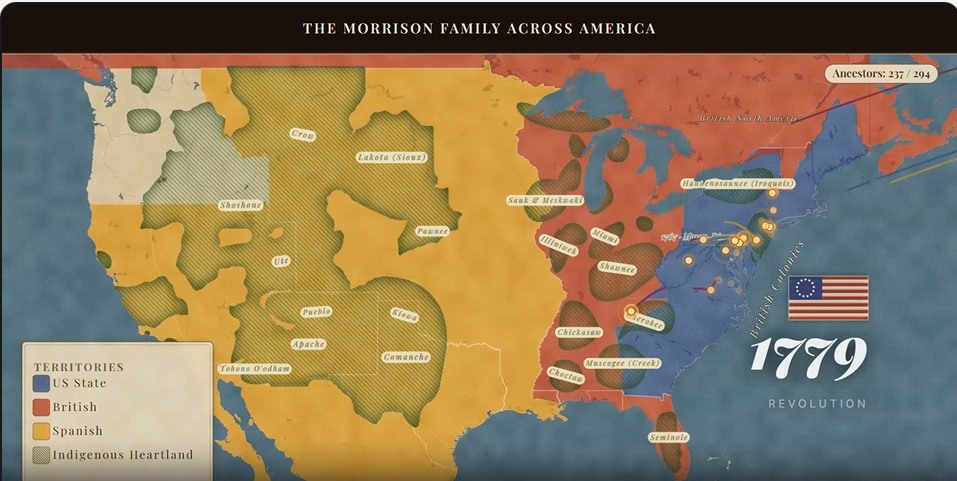
A frame from the film, “The Morrison Family Across America” – 1779
What Happens When You Press Play
You start with the file you already have. Ancestry, MyHeritage, FamilySearch, Family Tree Maker, RootsMagic, all export a GEDCOM, and there are step-by-step guides on the Tree Alive website for each one. If your tree lives on FamilySearch, you can skip the file and connect your tree straight to it with your FamilySearch login. TreeAlive is listed in the FamilySearch Solutions Gallery, the directory FamilySearch maintains for independent tools that work with its data.
From there, it reads the places in your tree, sets each ancestor on the map at the moment of each event in their life, and starts moving. People appear where they were born, families drift and split, and the trails reach west as the decades pass. Twenty years of research becomes about three minutes you can save and hand to anyone in the family.
The first time I watched my own tree play, it affected me in a way two decades of spreadsheets never had. It also started handing me questions. Why does that line jump from North Carolina to Indiana with nothing in between? Real move, or a hole in my research? Watching the family move turns out to be a good way to find where your evidence quietly runs out.
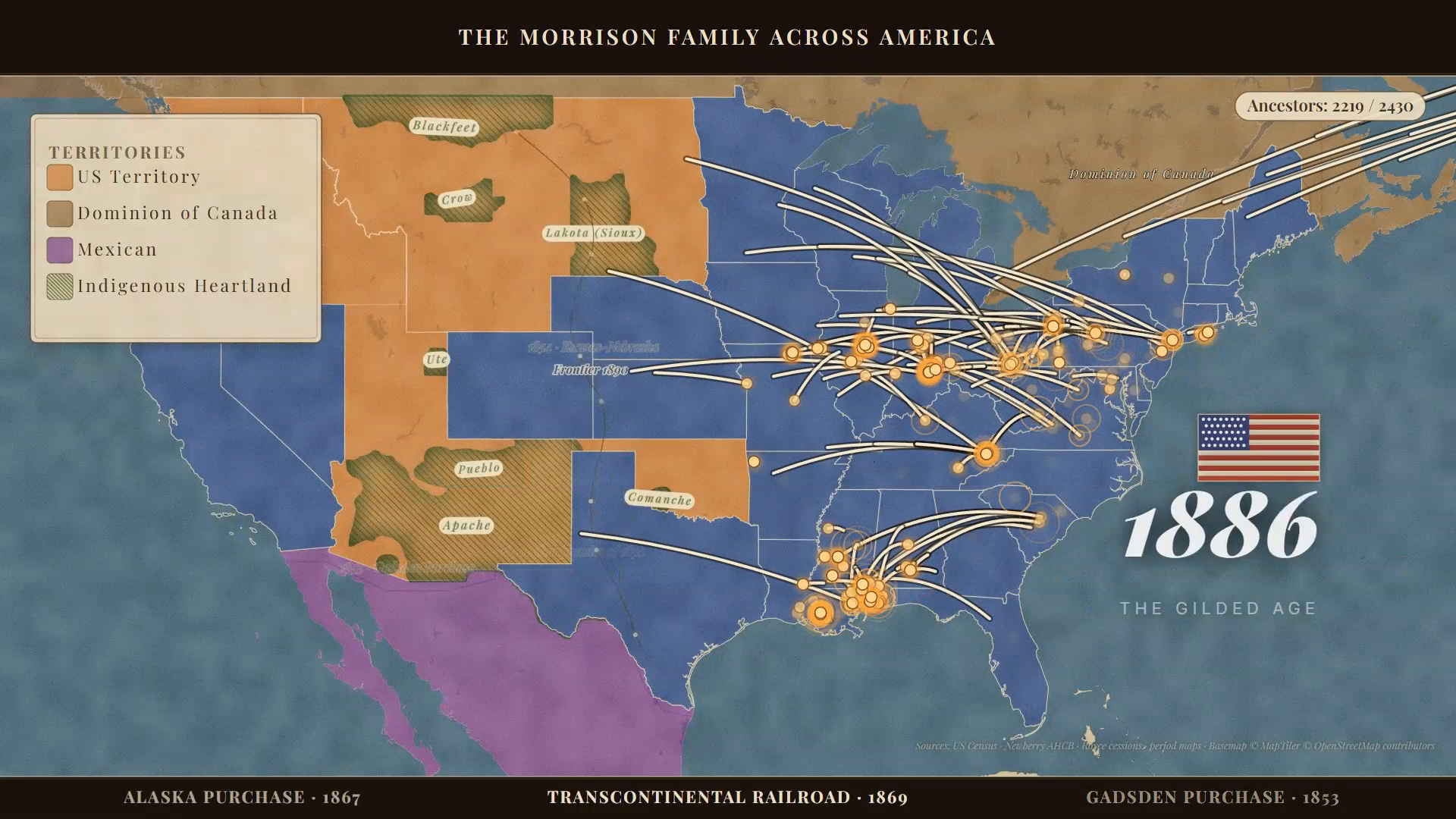
Film paused mid play
Putting the Revolutionary Generation on Revolutionary Maps
A modern map is the wrong stage for a 1770s story. State lines that did not exist yet, cities that were not there, and a tidy interstate-highway America flatten the strangeness of the world our ancestors actually lived in.
TreeAlive’s Time Machine feature addresses this directly. It draws on more than 100,000 georeferenced historical maps from institutions such as the David Rumsey Map Collection, the Library of Congress, the New York Public Library, and the National Library of Scotland, and overlays the appropriate period map onto your family’s locations. You can slide through time and watch the mapmakers’ world change underneath your ancestors: colonial boundaries, early turnpikes, county lines appearing as the frontier organizes itself.
For an America 250 ancestor, this means you can see their land sitting inside the world of the 1770s rather than the map of today. For me, it is personal. One of my own ancestors is Henry Wick, whose farm at Jockey Hollow became part of the ground where the Continental Army wintered, and who died in Morristown in 1780. Laying a period map under his name turns a date in my file into a place I can stand in, the encampment country as he knew it. That is the difference between knowing an ancestor lived through the Revolution and seeing how close the war came to their door.
The Time Machine overlays a period map on your family’s places. In the image below, my ancestor Henry Wick appears on a 1797 David Rumsey map of the Morristown country, near the Jockey Hollow ground where the Continental Army wintered. The period maps for this spot, with an opacity slider, are in the upper right.
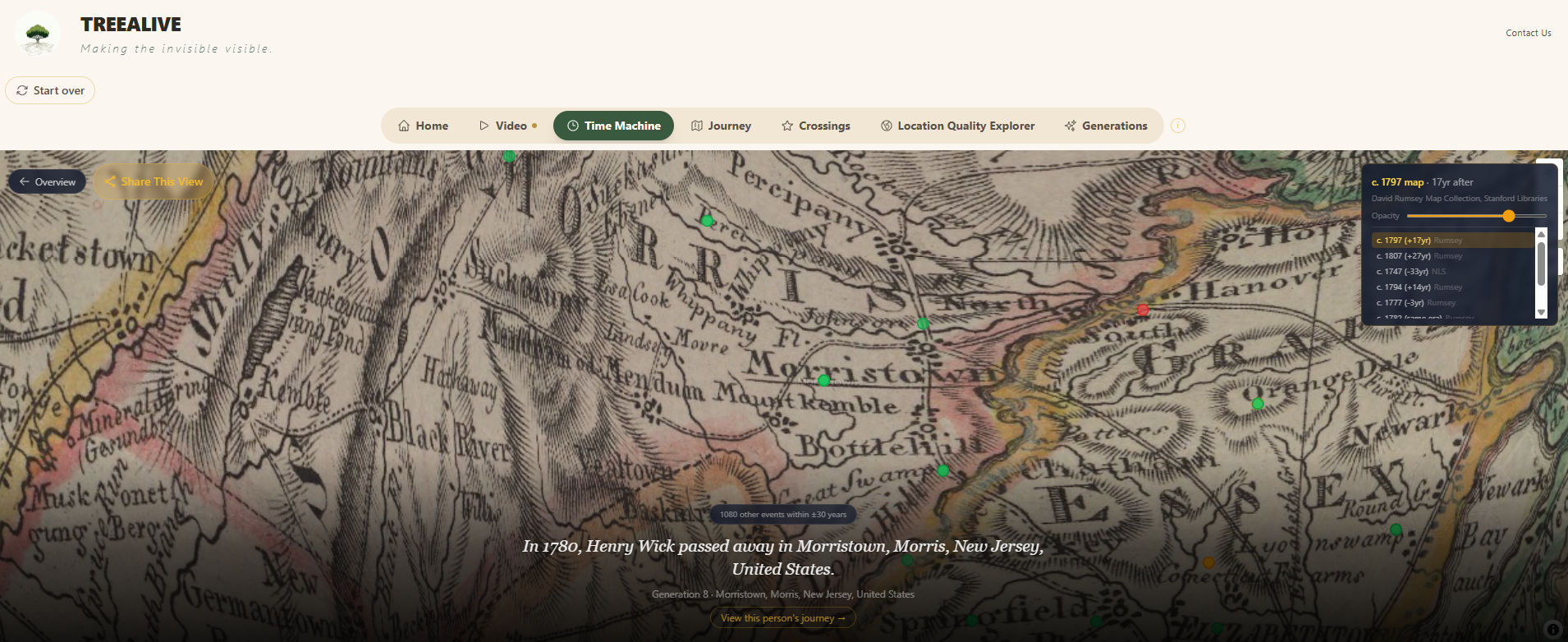
Ancestor Henry Wick’s location overlaid on a historic map from the David Rumsey Map Collection
Historic Crossings: Did Your Ancestor Cross Paths with History?
Diana’s recent post about Richard Wiatt Royston and George Washington is a perfect example of the most exciting kind of discovery: the moment your own family’s records touch a documented historical figure. A 1752 Spotsylvania County deed records that George Washington, then a young surveyor, ran the survey of an 861-acre Royston tract adjoining Fredericksburg.
That post is actually how I found Family Locket, and it is exactly the kind of discovery TreeAlive’s Historic Crossings feature is built to surface automatically. I have curated a corpus of more than 18,000 documented events in the lives of 268 historical figures, drawn from published letters, diaries, deeds, and established histories, with each event accompanied by its citation. Washington’s surveyor years are in there, including that February 1752 survey at Fredericksburg, alongside Thomas Jefferson’s and James Madison’s Virginia correspondence, Lafayette’s 1824 farewell tour, Abigail Adams’s letters, Benjamin Franklin’s years as colonial postmaster, and the circuits of many less famous but well-documented lives. Fifty-five of those lineages are active during the Revolutionary era alone.
When you load your tree, TreeAlive checks every ancestor against this corpus and shows you where your family and these figures were together at the same time. A reader whose family held land around Fredericksburg in the early 1750s, as the Roystons did, would see that the Washington survey surface on their own map. The tool will not tell you they shook hands; no responsible tool could. What it gives you is the overlap itself, with the source for the historical figure’s presence attached, so you can evaluate it the way you would evaluate any piece of indirect evidence. Sometimes a crossing is a curiosity. Sometimes, as with the Royston deed, it is a thread worth pulling.
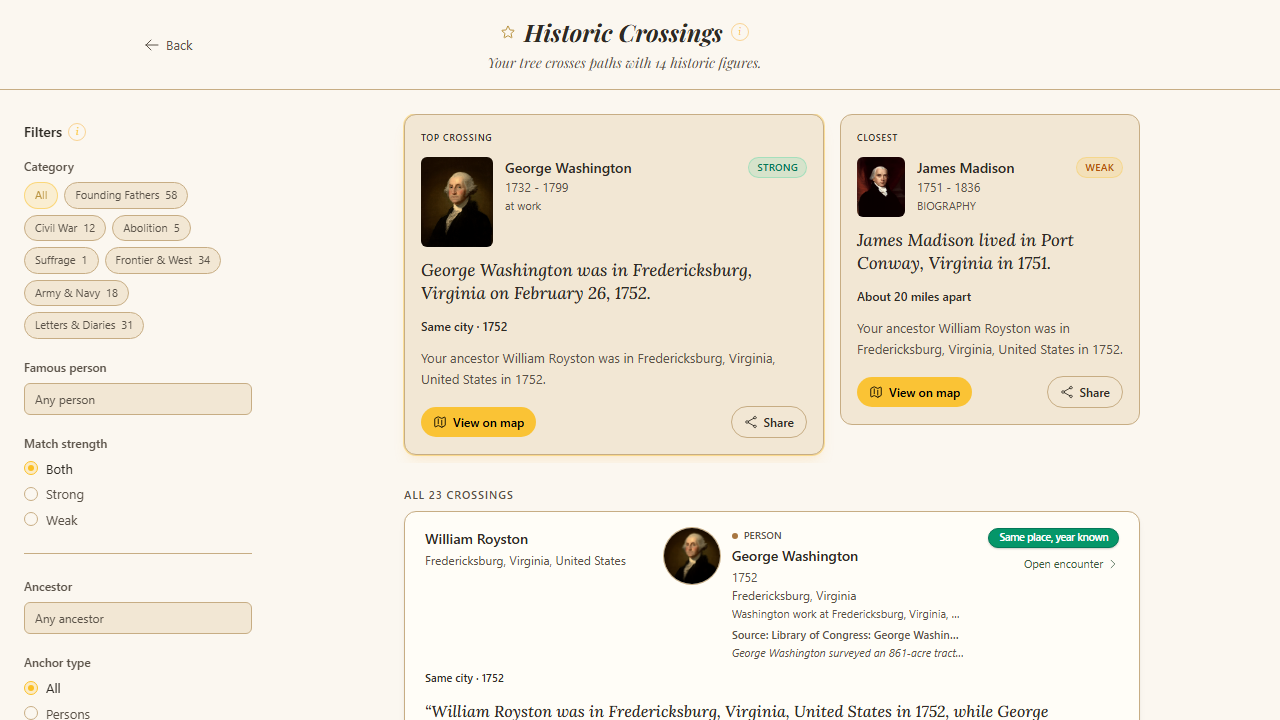
The Crossings tab showing an overlap between a user ancestor and a founding-era figure
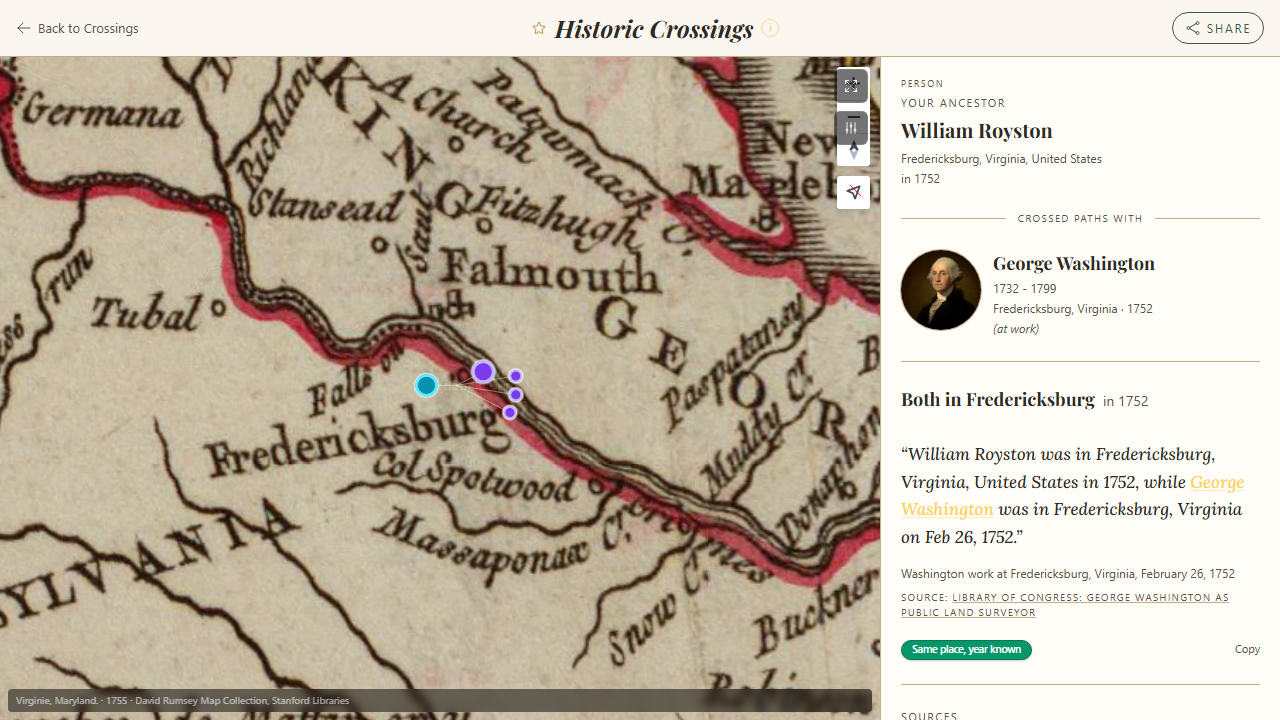
A crossing detail view with the event description and citation visible
An Honest Word About Place Names
Readers of this blog know that place names are where genealogical data goes to misbehave, and an automated tool has to make calls about them. “Washington County” appears in thirty states. The village your immigrant ancestor named in 1850 may have changed names, changed countries, or never appeared on a map at all.
TreeAlive works hard at this. It checks places against historical gazetteers, uses the rest of the family’s geography to break ties, and tells you its confidence for every placement. In fact, out of the entire project, the most work has gone into working on and re-working geocoding to handle as many different variations and unique cases as I can get my hands on. But it will not be perfect, especially on older and foreign place names, so the Locations view lets you review every placement, see exactly how each place was interpreted, and flag anything that landed wrong. I read every flag personally and they regularly turn into fixes. I then add them to a database of fixes which I check with each additional tweak to make sure all the previous fixes still work correctly. I would rather show you the tool’s reasoning and confidence to help it get better than pretend it’s perfect already.
In the image below, of the Locations view, you’ll see that every place in your tree is mapped and color-graded by confidence (precise, approximate, estimated), so you can see how each one was interpreted and flag anything that landed wrong
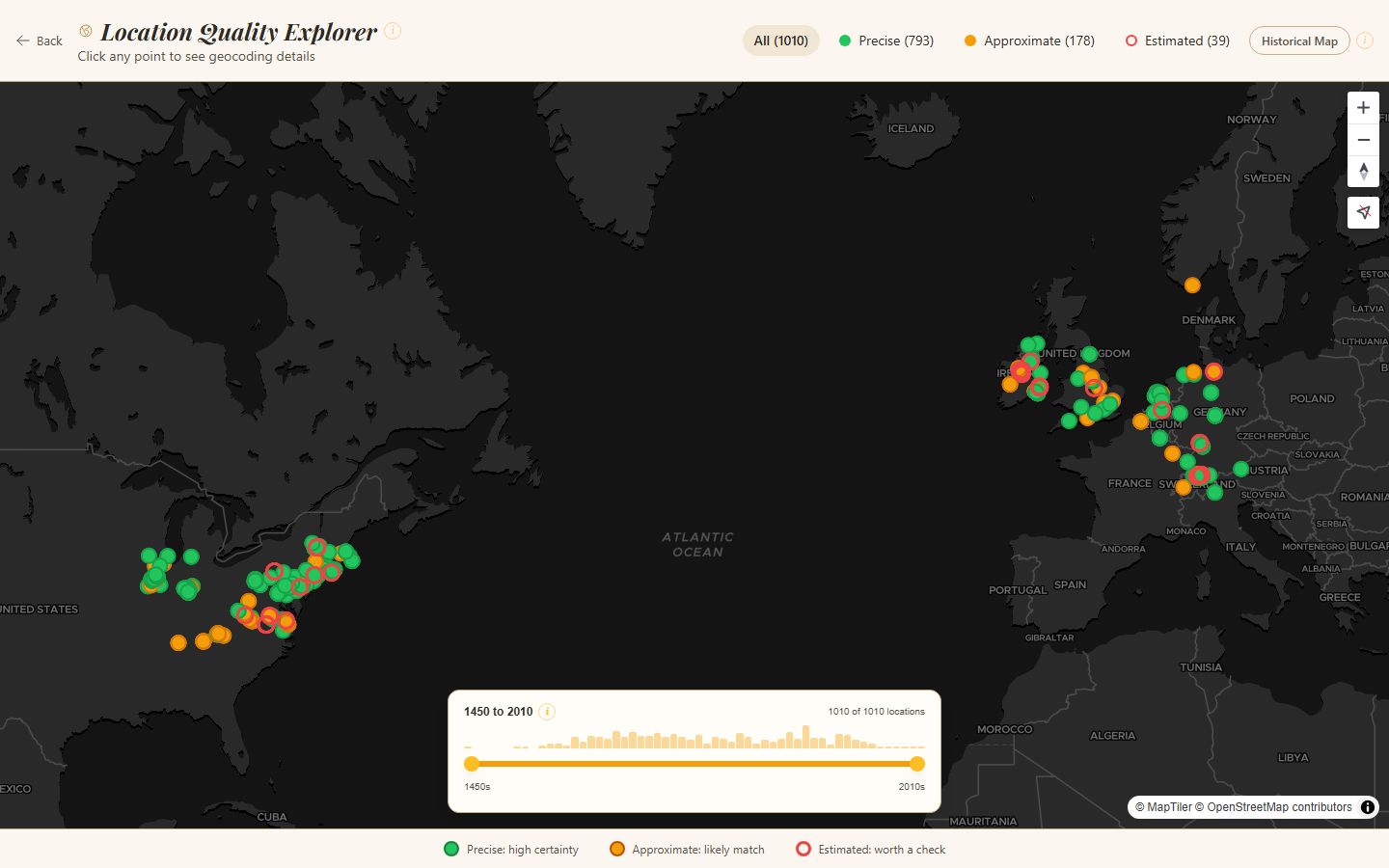
Locations View of TreeAlive
Getting Started
- Export your GEDCOM. Any size works; large trees simply take a little longer. Guides for each major service are at treealive.com/guides. FamilySearch users can connect directly with nothing to export.
- Give your places their full names where you can. “Goochland, Virginia” will always place better than “Goochland.” This is one case where careful RLP-style place recording pays an immediate, visible dividend.
- Start in Journey, then explore however you like. Once your tree geocodes, you land in Journey mode, a guided walk through your family, one stop at a time. The Time Machine, Crossings, and Locations tabs each give you a different lens on the historical context and accuracy of your tree, in any order. The Video pulls it all into a film of every migration over time, with a “Frontier” overlay of America’s changing borders, or worldwide views reaching as far back as your tree goes. Treat crossings as leads, not conclusions. Check the citation, then research it like you would any other clue.
- Share the video with your non-genealogist relatives. This is my favorite use. The cousin who glazes over at a pedigree chart will watch a three-minute film of the family crossing the continent, and that is sometimes the moment they start asking questions.
TreeAlive is free, with no account and nothing to install; it runs in your web browser. It exists because I wanted to watch my own ancestors move through the world they actually knew, and the America 250 anniversary feels like the right moment to offer it to people who have spent years, as I have, getting those names and places right. They have been sitting still in our files long enough.
Diana’s experience with TreeAlive:
I connected my FamilySearch Family Tree to TreeAlive with a click of a button and chose the direct ancestor choice to import my tree. Then I asked the site to create my movie – all which took about five minutes or less. We’d love to hear your experience with this exciting new tool! Comment below.
Best of luck with all your genealogical endeavors!









6 Comments
Leave your reply.