
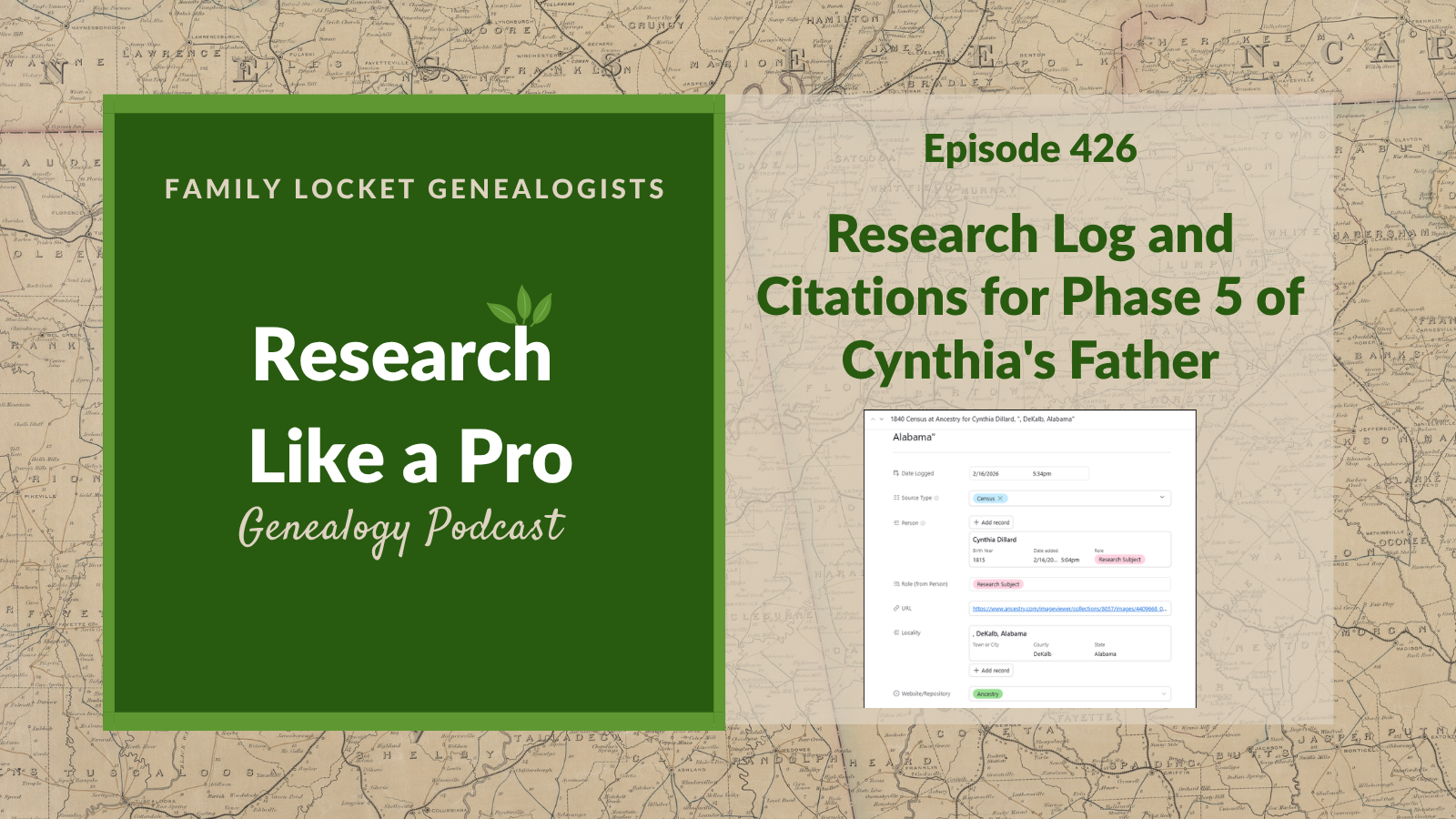
In this episode, Nicole and Diana discuss part 4 of Diana’s 5th project to search for the father of Cynthia (Dillard) Royston, focusing on research logging and source citations. Diana explains how she uses the Airtable template, “RLP with DNA 4.2 (2026),” to organize her project and enter data for key DNA matches. Nicole details the real-time logging process, noting how they enter data in either row or form views. To organize her research on three candidates—James, Joseph, and Tolliver Dillard—Diana groups her log entries by person and sorts them chronologically to create distinct timelines.
The hosts also explain how to quickly write citations using a layered model that divides a citation into digital and physical components. Using a FamilySearch image of a Cherokee County, Georgia deed as an example, they demonstrate how to construct the digital layer with the database name, URL, Image Group Number, and image number. They then build the physical layer by adding the original record creator, book and page numbers, and specific deed details. Listeners learn how to apply this systematic citation formula to deeds, probate, court, and tax records, making their genealogy research highly organized and easy to replicate.
This summary was generated by Google Gemini.
Transcript
Nicole (1s):
This is Research Like a Pro Episode 426: Research Log and Citations for Phase 5 of Cynthia Dillard’s Father. Welcome to Research Like a Pro a Genealogy Podcast about taking your research to the next level, hosted by Nicole Dyer and Diana Elder accredited genealogy professional. Diana and Nicole are the mother-daughter team at FamilyLocket.com and the authors of Research Like a Pro A Genealogist’s Guide. With Robin Wirthlin they also co-authored the companion volume, Research Like a Pro with DNA. Join Diana and Nicole as they discuss how to stay organized, make progress in their research and solve difficult cases.
Nicole (42s):
Let’s go. This episode is sponsored by Newspapers.com. Hi everyone, and welcome to Research Like a Pro.
Diana (50s):
Hi Nicole. How are you doing today?
Nicole (53s):
Doing well, how about you?
Diana (54s):
I am doing well, also. I’ve been having fun reading the second edition of Tom Jones’s latest book, which is titled Mastering Genealogical Proof, and he published the first one several years ago, I think over 10 years ago. And in his preface he discussed how we’ve had so many new developments with the use of artificial intelligence for genealogy, and DNA genetic genealogy. And so he wanted to do a new addition and address some of those issues and just really expand. It’s got a lot of new case studies, new questions. It really is a workbook.
Diana (1m 34s):
So at the end of each chapter there’s questions with answers in the back and things that you’re supposed to study, the case studies there and pull out, you know, things like what’s the indirect evidence that pointed to this or what, how did the author resolve this conflict? So, you know, I loved the first one. It taught me so much when I was doing accreditation, getting ready, just that that whole methodology of using the genealogy proof standard, it was such a good introduction, such a good education. So it’s fun to revisit and see how his thinking has developed and how some of the things have changed a bit from how we wrote it the first time.
Diana (2m 17s):
So, you know, I think we do that as Genealogists. We’ve done that with Research Like a Pro, right? That we keep developing the ideas and it evolves, so.
Nicole (2m 26s):
Yes, absolutely. I looked in the front of the previous edition and it was 2013 that it was published, so it’s been 13 years.
Diana (2m 33s):
Yeah,
Nicole (2m 34s):
and it’s neat that there’s been an update. I wasn’t expecting that. So it was really fun to see the, the new book come out at the NGS conference back in May. And it was fun to be able to have Tom sign it
Diana (2m 44s):
agreed
Nicole (2m 44s):
It’s just been great. I’ve learned a lot from Tom Jones over the last few years and it’s, I really appreciate the things that he does to help raise the genealogy community.
Diana (2m 57s):
I absolutely agree. And we went to his lecture, the lunchtime lecture at NGS where he talked about genealogy standards and how those have evolved through the last basically a hundred years. And that was fascinating how different people in different places were all coming to this same idea of what does it really mean to prove something genealogically. So I really appreciate his scholarly approach and his teaching, his examples, his writing. Anyway, I’m, I’m happy to be reading through that. I’ll probably share more things as I go, as I like to. I like to share what I’m reading and that’s, that’s been a fun thing to start.
Nicole (3m 36s):
Yes, you’ve always been such a good example of reading. I love talking about our fiction books together and then our nonfiction books. There’s just, you’re just a great example of reading. Thank you. Good job mom.
Diana (3m 50s):
Oh well, thank you. I have a friend who we were both in first grade together and back in the day in kindergarten you didn’t learn to read. I don’t even know if we worked on letters. We basically played outside, did little plays, did some music time, did some coloring. So you went into first grade and you really learned to read in first grade. And I remember just catching on so fast and being enthralled with the written word and loving it. And so my friend and I, he reminded me of this later, he goes, remember when we were the only two students that the teacher would let go to the big library to get big books because we’d already read everything in the classroom. I was like, I don’t really remember that, but I’m glad you told me about that ’cause that’s awesome.
Nicole (4m 35s):
That’s so fun, what a fun memory.
Diana (4m 38s):
Isn’t that fun? And then he turned out being the, we graduated like number, he was number three in the class and I was five in our graduating class. So yeah, we both were we’re scholars. We liked reading and studying and anyway.
Nicole (4m 53s):
That’s so fun.
Diana (4m 53s):
It’s funny. Well let’s do some announcements for the day. We are looking forward to the Research Like a Pro webinar, which will next be September 19th. And this one will involve DNA, which is exciting. It’s titled, Wanted: Bert Beckett – Solving Identity Through DNA and Records. Our presenter is Jill Nock, who is a professional Genealogist. She’s accredited through ICAPGen℠ in the Upper South region and nearly five decades of research experience. She operates Mountain State Genealogy and also subcontracts with us Family Locket Genealogists. She is a graduate of ProGen59, has completed advanced training at the Genealogical Research Institute of Pittsburgh, also known as GRIP, in Advanced DNA Evidence, Fundamentals of Forensic Genealogy, and Tools & Strategies for Tackling Tough Research Problems.
Diana (5m 52s):
A former Level 1 Mentor for ICAPGen℠ study groups, Jill has helped genealogists develop professional skills and meet accreditation standards. Her expertise combines traditional record analysis with advanced DNA interpretation, specializing in transforming complex research findings into clear professionally written reports. So we’re excited to hear all about it. This is going to be such a fun webinar. So our description says, Family stories can be our best leads, but how much truth do they have?
Diana (6m 39s):
This presentation follows the case of “Bert Fred Beckett” a supposed outlaw who rode with the Jesse James gang and later changed his name. Strategic DNA analysis combined with traditional records cracked a century-old identity mystery. So this is taking place in our neck of the woods, it’s Missouri, Oklahoma, AncestryDNA, Census Records, Death Certificates, Marriage Records, Court Records, Leeds Method. Wow, I’m excited to hear that. That’s gonna be so fun. The next study group will involve DNA. So if you are thinking about diving into learning more about how do you use DNA in a real research project, we will be starting that February, 2027. So look for registration that usually opens up in December. And then if you’re interested in learning more about all the things going on with FamilyLocket, be sure to join our newsletter.
Diana (7m 22s):
Comes out every Monday, has our new posts, upcoming lectures, coupon codes, all the good things. Upcoming conferences, this is coming pretty quickly, it’s the APG Professional Management Conference on October 14th through 17th. I’ll be teaching about Managing Client Projects and Contractors with Google Sheets and Airtable. And then I’m also leading a panel discussion: From Concept to Classroom: Genealogists Share How They Built Courses that Teach and Inspire. And then Nicole is doing a panel as well: Find Your Voice: Podcasting as a Path to Community, Clients, and Credibility, and a workshop: Airtable Meets AI: Smarter Transcription & Research Logging.
Diana (8m 11s):
So these will be fun talks for us. It’s a little bit different to talk from the professional angle, but we have both learned so much from our years of professional genealogists and it’s fun to switch gears a little bit and teach about that. We are also looking forward to the Research Like a Pro Institute which will take place in February, 2027. This is led by Jan Joyce and it is on i. Merging and Separating Identities. So if you missed this last spring, here’s another opportunity to take this amazing institute and learn all of the tools and techniques that Jan has to offer.
Nicole (8m 41s):
Yeah, we’re really excited to be offering that again, it’s gonna be great. And for those of you who are wondering if you can watch recordings, yes, the sessions are recorded for that and then there’s like a month after it ends that you can watch the recordings. Alright, well today we’re talking about your ongoing search for Cynthia’s father. And so for you listeners, if any of you have an ancestor who’s still a mystery despite years of research, you can relate to our search for Cynthia Dillard Royston’s parents. Diana’s currently on phase five as part of the Research Like a Pro with DNA study group and she finished it up, but we’re just talking about it at this point.
Nicole (9m 22s):
And so it’s fun to go through all the Research Like a Pro steps with a case study. So that’s what we’ve been doing with this and we’ve talked about the research objective and the timeline locality research and research planning. And today we get to talk about the research log and the source citations and kind of the path that the research took a little bit. And so eventually we’re hoping to have one man left standing whom documentary and DNA evidence point to as Cynthia’s father. So let’s get to this. Let’s hear about research logging.
Diana (9m 56s):
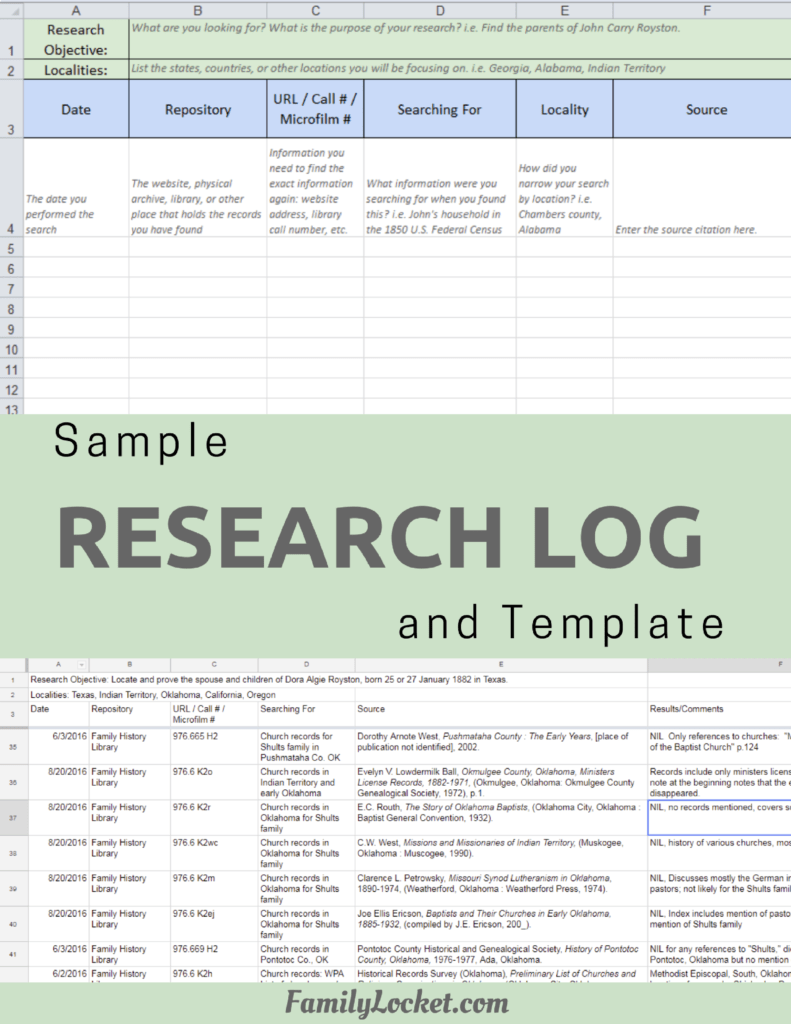
Well as everybody knows who are longtime listeners, Airtable is the research log we’ve been using and I started using it ever since Nicole created the very first template and posted it on Airtable universe and every year we’ve updated that template with more functionality. So this year was no exception and even though I did have already several research logs from past projects on Cynthia, some of them from the very beginning when I was using an old Google Sheet template, I decided this is a great opportunity to use the new template. It’s titled RLP with DNA 4.2 (2026).
Diana (10m 37s):
So if you want to take a look at that, you can see that out on Airtable Universe and we can have a link to that in our show notes. It’s also on our website over on the sidebar, it usually has a link to to the Airtable templates and just know that there are two versions. One is prefilled with sample data that you can delete once you understand how to enter your project information. Once you get the hang of it, you could just always use the blank one and then you can go forward. So you might be wondering if you should use the DNA research log even if you don’t have DNA and we always recommend starting with the DNA research log.
Diana (11m 20s):
You can move all those DNA tables out to the end of of your view and then if you do want to add DNA in the future, you’ve got them there and it’s really easy to move those tables around and reorganize them. A lot of times I’ll move the timeline all the way to the left and then the research log, you know, just however, whatever I’m working on, I kind of wanna have it be front and center on the end. So you’ll be able to see some of the tables in the Airtable base if you go look at the blog post, I did some screenshots there and you can just see you know, what some of the different things look like. But Airtable has a bit of a learning curve and once you learn it, we’ve had so many people tell us that they’ll never go back because they just love the functionality and ability to do things so easily with it.
Nicole (12m 14s):
Awesome, great overview of Airtable for a research log. So in the research logging process, once you have your solid research plan, it’s simple to sit down at the computer, open your Airtable base and start logging, logging the searches. And the way we do it is to fill out the log record as we research. So you can view and enter data either in row view or you can open up that record or row and see it in form view to fill it out. And we generally use the row view, but having the form option is nice since it opens up larger on your screen, more kind of like a document rather than tabbing over to each cell.
Nicole (12m 54s):
Once the fields are filled out, you can easily sort and group by any of the fields. And this was really useful for the Dillard project it sounds like because you were able to research three candidates for Cynthia’s father: James, Joseph and Tolliver Dillard, and then keep the research log grouped by person and sorted chronologically so that all the records for each man formed a different timeline for each of them. You could see everything all at once. You could see each man’s separate records as their own view and it’s super nice to be able to separate those out when you need to. It’s nice to also be able to adjust the row height from short to extra tall ’cause sometimes you want to see the big picture of the research and so you can use the short view to kind of see more records at once and other times you wanna see all the details and the full source citations so you change it to extra tall.
Nicole (13m 46s):
So your first step was to review online family trees for each man and those didn’t have associated dates. So when sorted they appear at the top of the list so you can easily see those family trees. And then you can also group by locality, source, or website or repository.
Diana (14m 4s):
Using Airtable just made it so easy to see what I had on each man. I love that grouping feature. It really was amazing, and as I focused on first James and then Joseph and then Tolliver, I would just keep adding and if I had to leave it for a week or two and come back I could quickly see what I had. Really, really lovely to have my research log going. Well let’s talk a little bit about source citations because this is so important in this whole phase of research and one thing that I have learned is that you really should create the source citation the first time you view the source. And there’s a couple of reasons for this.
Diana (14m 47s):
One is to truly understand the source. So often we are looking at a record that perhaps came up on FamilySearch as full tech search or it was a hint on Ancestry and we don’t really know what it is all about. We don’t know where did it come from, who created this record, what is this part of? And so if we take a little bit of time to dig into the source and the collection and learn about it, we will not only learn more and you know, deepen our understanding, it will help us with the analysis as we are thinking about what that source is telling us. But then it also gives us all the information to really identify the source and return to it in the future and giving us all the information we need for creating our citation.
Diana (15m 37s):
So it can be really tricky with some of these collections. And we’re going to dive into how I did source citations with FamilySearch images because I use those so much for this project. And of course those are original records that have been imaged and so we’re going to have a couple of layers and I came up with a really good method to get those done quickly. And so I thought it would be fun to share a little bit about how that works.
Nicole (16m 9s):
Great. Let’s have a quick word from our Sponsor. Are you ready to take your family history research beyond names and dates?
Nicole (17m 13s):
If so, Newspapers.com is a game-changer for genealogists of all levels. With access to over a billion pages of historical newspapers, you can uncover rich, untold stories about your ancestors that you won’t find anywhere else. Imagine discovering a detailed obituary that reveals the extended family, or a local news story that highlights your great-grandmother’s role in the community. Maybe you’ll come across a photo capturing a moment in your ancestor’s life—something that brings their story vividly to life. Newspapers captured the everyday details—announcements, happenings, achievements, and challenges—that paint a fuller picture of who your ancestors were and what their world was like. These primary sources reveal the social history behind the names on your family tree and help you connect with your past in a personal, meaningful way. Searching is simple and intuitive, letting you explore by name, location, or date to unearth those hidden gems. Ready to enrich your research with stories you won’t find in traditional records? Visit Newspapers.com/FamilyLocket today and get 20% off a subscription. Start turning your family tree into a family story. Okay, well let’s do a FamilySearch image citation example. So is this one that you created or is this one that FamilySearch created?
Diana (17m 23s):
This is one I created so why don’t you read it and then we’ll go through each layer and discuss it.
Nicole (17m 30s):
Okay, great. So the citation starts off, a. Cherokee County, Georgia, Superior Court, Deeds D:85, James Dillard of Twiggs County, witness to deed, Yates to Harrison, 1836; imaged, FamilySearch, and then the URL, accessed 6 June 2026), IGN 7900716, image 429 of 658.
Diana (18m 1s):
Perfect, thank you. Okay, So I am going to give everyone my process how I do this when I’m looking at FamilySearch, I didn’t include what they gave for a citation but it’s, it’s not super descriptive. I mean it’s okay, but I prefer to have something that gives more detail, is more descriptive, so when I look at it I really understand what I’m looking at. So what I have learned to do is I actually start the citation with the digital layer. So from what Nicole read, you saw the physical information was first as it would be in the book, the actual book at the county courthouse. And then the second part is the digital layer with citing how we get to it on FamilySearch.
Diana (18m 45s):
So what I’ve learned to do is I start with that digital layer and then when it’s completed I can fill in the information for the physical layer. So I just type in first and you might think this is kind of funny but I’ll explain why. So I just type in the semicolon ’cause I know this is going to be a layered citation, I’m gonna have two pieces I I separate with that semicolon, and then I type in imaged and then I do FamilySearch, I do that in italics because it’s a publication, a website. And then I get the URL in immediately I just go up and I copy the URL and then I put the access date. And I always on FamilySearch cut off the URL before the question mark to shorten it, and I always test it to make sure that really opens up correctly.
Diana (19m 34s):
But these are URLs they have in them ARK, so they archival URLs that FamilySearch has assured us are not going to change. So we’re we’re holding them to that, but even if they do change, we’re gonna have enough physical information we could get to back to the source. So I put that in and then I put in the IGN number. So you have to do a little bit of finagling to get to this. So if you are clicking on something, you know in in full text search it will open up to the transcript page which gives you the AI transcription on the side. And to find the actual Image Group Number, which is what you want for the description for this digital layer, you have to click information at the top and then that opens up a different sidebar and if you scroll down it will give you the Image Group Number.
Diana (20m 22s):
So it was 7900716 and then I always put the image number. So this one had image 429 of 658 and I’d like to put that whole thing in there because that will help me to see if I’m in the right collection because you can look up and see, Oh yeah there are 658 images, this is, this is the right one. Now after I have that all done, then I can start clicking around in that collection like at the beginning trying to learn about what this is and if I lose my place I can quickly get back because I already have recorded its image 429. So I had to learn that by that experience when I would be clicking around and then I couldn’t get back very quickly to the actual image I wanted to look at.
Diana (21m 9s):
So that’s why I start with the digital layer. It’s really easy to put all that together and then you just get to go onto the physical layer.
Nicole (21m 17s):
Okay, great. That’s perfect. So with the digital layer created, you can now examine the record carefully and easily return to the page in question. And the goal here is to understand the source clearly. And to do that we need to go to the beginning of the images to find out more. And in the citation for this deed, the FamilySearch collection is titled “Cherokee. Deeds 1836–1840, 1838–1839, Mortgages 1836–1840, 1838–1839.” This is not descriptive enough of the specific deed, so you browsed the images for the beginning of the deed book and you clicked on the grid box to open the multiple image view and then you scrolled up to find that this particular deed is from book D and this collection holds many deeds and mortgage books.
Nicole (22m 5s):
So you just wanted to ensure that you cited the correct one. That’s exactly what I do. And so once you understand what type of source you are using, then you can record the details such as the creator of the record, and the volume, and page number. And so the physical area ended up being c. Cherokee County, Georgia, Superior Court, Deeds D:85. So when you say D:85, that just means volume D, page 85 and there’s a colon in between them, which is kind of just a way of showing the volume and the page number. It’s a convention used in citations, so the title of the volume deeds, the volume number or letter D, and then colon and then the page number 85.
Nicole (22m 53s):
And then to finish the physical layer you put in the specific details about the people involved and the date. James Dillard of Twiggs County, witness to deed. So we’re citing the fact that James Dillard was a witness to a deed. Then we’re citing the people who are in the deed. So that would be: Yates to Harrison, 1836 which is the date of the deed. So that’s it. Now you know how the citation came together.
Diana (23m 21s):
Right, and once you have a formula like that, it’s pretty quick and easy to create all those FamilySearch citations. I use it for deeds, probate, court, tax records, pretty much anything that FamilySearch has there, I just do the same thing over and over, get the digital information in quickly and then start learning about what was this record. And so many times I, it just helps me to understand what was this, when was it created? Is this part of a larger book? You know, there’s just so many things we can learn by scrolling through that digitized microfilm on FamilySearch. So can you use the same formula, the same idea, for say something on Ancestry or Find My Past or on a totally different website?
Diana (24m 9s):
Yes, you can. Of course you can. And so you know, I would recommend that you get your own citation flow, but if you’re trying to figure out how better to work with those images on FamilySearch, maybe this can give you some ideas.
Nicole (24m 23s):
Yeah, that’s definitely a great way to have a, a plan or a formula or just figure out how you’re gonna do it. And I think as you practice the citations, you definitely kind of get that going in your mind of just like, I need to do the physical layer, I need to do the digital layer. Here’s the elements I like to include. I know as I was figuring out kind of my flow and my formula, I really decided that I thought it was valuable to have the full URL in the citation because it’s so valuable to be able to click that link because most of what we do now is reading and writing digitally, and with a clickable link it’s just so fast to get back to the original source for these FamilySearch images. So that quickly became part of my formula and I know you do that too.
Nicole (25m 6s):
And so the other thing I think that that becomes kind of like second nature with this type of citation is looking for the title of the volume. And that can be a little bit tricky. I remember that feeling very unintuitive to go back and figure out like what’s the first page of this volume? What volume is this? Like it’s something that it seems like it should be obvious, but then it’s hard to find. You have to like literally go back in the images until you see the beginning of that deed book and look at the spine, the image that has the cover and look at the spine and see, oh this is Deeds book D. And once I figured that out, it became a lot easier to like build that into the flow of understanding the source and opening all those other images and looking back.
Diana (25m 50s):
Exactly. And you know, sometimes you have to do this, especially with the tax books because they will microfilm all the tax records for a run of say, 10 years. And those old tax records very seldom put the date at the top. Like, is this 1836 or 1838, 9 or 1840? Oh and sometimes they mix ’em up, they’re not chronologic. And so you, you have to literally sometimes go back a few images until you find the very first one where it will have the date. So sometimes it is, it can be kind of challenging, but then it’s also really good to do that discovery because maybe you’ll find out that they just didn’t microfilm or there is no 1838 tax record and you don’t want to just assume your ancestors not found there when there actually is no record.
Diana (26m 39s):
So you know, it’s all about that idea of learning more about your source, putting the source you’re looking at in proper context of the whole collection and what was being recorded. So many things that we can do when we’re creating our citations who thought that, you know, creating a citation could help us so much in our analysis and our work with these records.
Nicole (27m 1s):
Yeah, it really does help you. And another thing that’s great about putting it into a tabular format in a research log like Airtable or Excel is that it helps you to see consistency among your citations or note inconsistencies so that you can realize, oh, I put the year on this one but I forgot to put the year on this one. Or I have the the volume and the page number for this one, but on this one I forgot to add the volume. And so you can kind of notice those things as you’re logging and then you can remember to include all the things you need to, and this is especially obvious when you’re doing a run of tax years or multiple dates all in a row and you’re kind of grouping your research by source type like that.
Nicole (27m 45s):
And that helps you to really make your citations very thorough and clear and consistent.
Diana (27m 52s):
Right, sometimes I will just take one citation, say a tax record, you’re doing several from the same collection, and just copy and paste that changing the years and the URLs. The only danger is if you forget to change something, which I have done in the past, I’m like, oh no, I have two that are the same. Ah! But I also, in my filling up my research log, I, the other thing I do almost immediately is to grab the full URL and put it in the URL section of the research log. So if I have forgotten to update the citation, I can go find it again really quick. So that’s another trick, get that URL in there very quickly into that part of your research log.
Nicole (28m 33s):
So true. Another trick that sometimes I’ll do, I’ll put in for, for doing a run of tax records, you know, multiple rows for different years. Sometimes I’ll just put in like this, the info that I know will be the same for all of them and then duplicate that row so that it has like the county, the state, you know, the stuff in the citation that will truly be the same.
Diana (28m 58s):
Yes, I’ve done that too, yes.
Nicole (28m 59s):
Then you won’t have that problem of like, oh no, this has got the duplicated year of the other one and that’s wrong and ’cause that happens to me too if I do that.
Diana (29m 10s):
I know it’s funny, we just get on a roll and sometimes these little mistakes creep in, which is why when you write the report and then you are putting this all together, sometimes that’s when you notice, you know, or when you’re doing your analysis, you realize some of those mistakes. But you know, it’s okay we, we do our best.
Nicole (29m 30s):
Yeah. And we catch it and we work with it. It’s part of trying to incorporate more efficiency into the research and and also figuring out what you need to do to make sure you don’t lose accuracy and specificity at the same time.
Diana (29m 45s):
Right. And you know, if you’re just getting started with this whole idea of, of even logging your research at all, then just put in the FamilySearch citation and do the URL. You can get to the next level if you want to later down the road. But sometimes it’s just enough to get that basic information in. You know, we have evolved in all the things that we’ve done including research, logging and citations just from experience and everybody has to start somewhere. We would encourage you to keep a log and do citations regardless of how it looks. Get that information in there.
Nicole (30m 26s):
Yes, absolutely.
Diana (30m 26s):
Alright, well this has been so fun discussing research, logging and citations. I mean, we are true genealogy nerds that we love doing this and talking about it, so we hope we are reaching some of you other genealogy nerds out there who just love doing this kind of stuff as well.
Nicole (30m 43s):
Shout out to all the nerds
Diana (30m 46s):
Next time on the podcast we’re going to talk about what I found because I did have some good findings, some good conclusions coming from my report. And so we will talk all about writing the report, correlating and analyzing and have some fun with that next time. So great. Thanks everybody for listening and we will talk to you next time. Bye-bye.
Nicole (31m 11s):
Bye-bye. Thank you for listening. We hope that something you heard today will help you make progress in your research. If you want to learn more, purchase our books, Research Like a Pro and Research Like a Pro with DNA on Amazon.com and other booksellers. You can also register for our online courses or study groups of the same names. Learn more at FamilyLocket.com/services. To share your progress and ask questions, join our private Facebook group by sending us your book receipt or joining our courses to get updates in your email inbox each Monday, subscribe to our newsletter at FamilyLocket.com/newsletter. Please subscribe, rate and review our podcast. We read each review and are so thankful for them. We hope you’ll start now to Research Like a Pro.
Links
Finding a Father for Cynthia: Phase 5 – Part 4: Research Log and Source Citations – https://familylocket.com/finding-a-father-for-cynthia-phase-5-part-4-research-log-and-source-citations/
Sponsor – Newspapers.com
For listeners of this podcast, Newspapers.com is offering new subscribers 20% off a Publisher Extra subscription so you can start exploring today. Just use the code “FamilyLocket” at checkout.
Research Like a Pro Resources
Airtable Universe – Nicole’s Airtable Templates – https://www.airtable.com/universe/creator/usrsBSDhwHyLNnP4O/nicole-dyer
Airtable Research Logs Quick Reference – by Nicole Dyer – https://familylocket.com/product-tag/airtable/
Research Like a Pro: A Genealogist’s Guide book by Diana Elder with Nicole Dyer on Amazon.com – https://amzn.to/2x0ku3d
Research Like a Pro with AI Workbook – Second Edition (eBook) – https://familylocket.com/product/research-like-a-pro-with-ai-workbook-second-edition-ebook/
14-Day Research Like a Pro Challenge Workbook – digital – https://familylocket.com/product/14-day-research-like-a-pro-challenge-workbook-digital-only/ and spiral bound – https://familylocket.com/product/14-day-research-like-a-pro-challenge-workbook-spiral-bound/
Research Like a Pro Webinar Series – monthly case study webinars including documentary evidence and many with DNA evidence – https://familylocket.com/product-category/webinars/
Research Like a Pro eCourse – independent study course – https://familylocket.com/product/research-like-a-pro-e-course/
RLP Study Group – upcoming group and email notification list – https://familylocket.com/services/research-like-a-pro-study-group/
Research Like a Pro Institute Courses – https://familylocket.com/product-category/institute-course/
Research Like a Pro with DNA Resources
Research Like a Pro with DNA: A Genealogist’s Guide to Finding and Confirming Ancestors with DNA Evidence book by Diana Elder, Nicole Dyer, and Robin Wirthlin – https://amzn.to/3gn0hKx
Research Like a Pro with DNA eCourse – independent study course – https://familylocket.com/product/research-like-a-pro-with-dna-ecourse/
RLP with DNA Study Group – upcoming group and email notification list – https://familylocket.com/services/research-like-a-pro-with-dna-study-group/
Thank you
Thanks for listening! We hope that you will share your thoughts about our podcast and help us out by doing the following:
Write a review on iTunes or Apple Podcasts. If you leave a review, we will read it on the podcast and answer any questions that you bring up in your review. Thank you!
Leave a comment in the comment or question in the comment section below.
Share the episode on Twitter, Facebook, or Pinterest.
Subscribe on iTunes or your favorite podcast app.
Sign up for our newsletter to receive notifications of new episodes – https://familylocket.com/sign-up/
Check out this list of genealogy podcasts from Feedspot: Best Genealogy Podcasts – https://blog.feedspot.com/genealogy_podcasts/


Leave a Reply
Thanks for the note!