
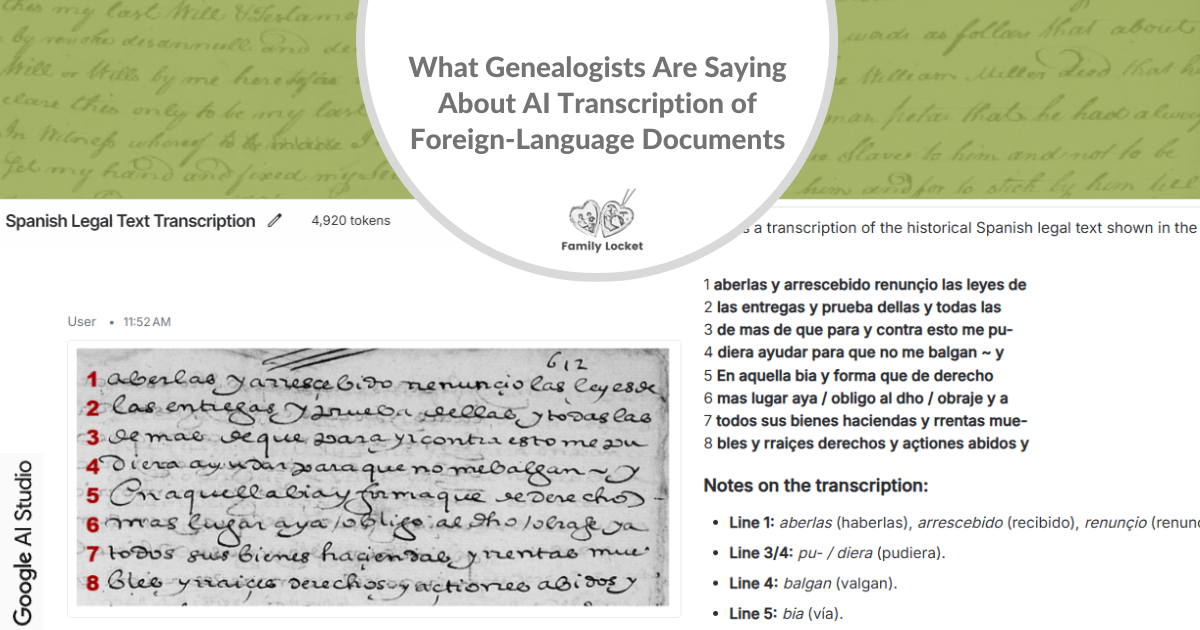
If you’ve ever stared at a page of Kurrent script or a faded colonial Spanish church record and wished for a little help, you’re not alone. As you know, handwritten text recognition is one of my favorite topics—but I mostly research documents created in English, so when it comes to foreign-language records, I wanted to learn from all of you. I asked in the April 6 Family Locket newsletter: Have you been using AI to help you transcribe handwritten historical documents in other languages? How is it going? Which tools work best for your language?
The response was wonderful! If you haven’t shared your experience yet, we’d love to hear from you—please fill out the AI for Handwritten Historical Document Survey (Non-English). In the meantime, here’s what we’ve learned so far from the genealogists who have responded.
*This post was written with the help of Claude Sonnet 4.6, an AI assistant.
Who Responded
Respondents ranged from occasional users to frequent ones, working across a wide variety of languages and centuries. The languages represented included:
- Spanish (colonial records)
- German (Gothic script and Kurrent)
- French
- Latin
- Slavic languages (Russian, Polish)
- Italian
- Nordic/Scandinavian languages (Swedish, Norwegian)
Time periods spanned from the 1600s all the way through the mid-twentieth century—a remarkable range that puts these tools through their paces.
Tools Genealogists Are Using
Respondents used a variety of tools, often in combination with one another. The most commonly mentioned were:
- Transkribus – a specialized transcription platform developed in partnership with archives, with models trainable to specific scripts
- Gemini (via Google AI Studio and the Gemini web app)
- ChatGPT
- Claude
- Leo (tryleo.ai)
Many genealogists used more than one tool, comparing results or using each for different purposes. One respondent noted using Google Translate to convert French to English and then Claude to “summarize and pull out family relationships.” That kind of multi-tool approach is becoming more common.
How Well Did They Work? Overall Accuracy Ratings
On a scale of 1–10, respondents rated their overall experience with AI transcription for foreign-language documents at an average of around 7.5 to 8 out of 10—quite positive! The highest ratings came from those working with French and Spanish colonial records using Gemini, with some reporting a perfect 10.
When asked to rate accuracy in specific categories, respondents gave the following general picture:
- Reading the handwriting – Most rated this as Good to Excellent, though Fair ratings appeared for older documents and poor-quality scans
- Language accuracy – Good across the board, with some Fair ratings for particularly challenging scripts like Kurrent and pre-reform Russian
- Punctuation – Generally Good to Excellent
- Table/column data – When applicable, ratings were more mixed, with some Excellent and some Fair—this is a known challenge for AI tools
- Speed – Consistently rated Good to Excellent by nearly everyone
The amount of correction needed varied considerably. About half of respondents reported needing only 5–15% correction (minor), while others working with older or more complex scripts needed 16–30% correction (moderate). A few working with very old documents in poor condition found they needed significant correction—sometimes more than 50%—which could make AI assistance less efficient than working manually.
The Biggest Challenges
Respondents were candid about where these tools fall short. The most frequently mentioned challenges were:
Proper names and places. Nearly everyone mentioned that AI struggles most with surnames, given names (especially in languages where naming conventions differ from English), and place names. One respondent put it plainly: “Surnames and places.” Another added that “obscure place names, and especially cryptic abbreviations” were the hardest to verify.
Old or poor-quality documents. The older the record, the trickier it gets. One respondent noted that their Transkribus model became less accurate the further back in time the documents went. Poor scan quality was another common culprit—as one person observed, “Light scans—words can be missed.”
Verifying the results without knowing the language. This was perhaps the most significant concern. One respondent working with pre-reform Russian shared: “I don’t know how to double-check the results… it would be easy to miss an improper spelling.” This is a real limitation that deserves honest attention.
Subtle hallucinations. Several respondents—especially those using Gemini—noted that errors from large language models can be surprisingly plausible. One experienced researcher wrote: “To ensure an accurate transcript, I need to review the product very closely. Any errors it makes will be both subtle and plausible given the context.” This is different from Transkribus, where errors “are usually pretty obviously incorrect, so pretty easy to spot.”
Unusual letter forms and individual scribal hands. One respondent working with Polish records noted that “Whomever wrote the records I’m using had a different style for certain letters than most. It is incredibly challenging to do manually.”
Tips From the Field
The real gems in any survey are the tips that come from people who have learned through experience. Here is the collected wisdom from our respondents:
1. Provide as much context as possible in your prompt. Tell the AI what language it’s working with, the approximate time period, any names or places you already know, and any quirks of the document. One respondent advised: “Always provide a sample document and specific instructions such as surnames may be underlined.” Another suggested: “If the document is written in German with Latin mixed, tell the model.”
2. Work in small segments. Trying to transcribe a long document all at once can reduce accuracy. Several respondents recommended working “small segments—1 to 2 paragraphs” at a time.
3. Learn at least the basics of the language and script before you begin. You don’t need to be fluent, but knowing key vocabulary pays dividends. One respondent pointed to FamilySearch’s wiki for French genealogical words as a helpful starting point. Another recommended a local workshop on reading handwritten texts to better understand how to catch errors. Knowing what a word should look like in the target language helps you spot problems quickly.
4. Do a rough manual read before turning to AI. Several of the most experienced respondents had a similar workflow: read through the document themselves first, do a manual data extraction, and then ask AI for clarification or a full transcript. One put it this way: “That forces me to improve my own skill, but it is very slow! Lately, I have been trying to research more efficiently by just doing a rough manual genealogical data extraction before turning to AI, often to ask specific clarifying questions.”
5. Print the image and transcription side by side for review. One respondent shared a practical tip: “Print out the original image and the transcribed text and review word by word.” This old-fashioned approach works beautifully alongside new technology.
6. Learn what key words and phrases look like in the target language ahead of time. One respondent working with Polish records described how learning that Polish birth registries listed the child’s name after the phrase “дано имя” allowed them to visually scan the record and find the name quickly, without translating word by word. The equivalent of “godmother” in French, or “Francisco” vs. “Franciszek” vs. “Фрэнсис” in Polish, can make all the difference.
7. Be cautious with table and column data. AI tools in general perform less consistently when transcribing records formatted as tables or columns. If you’re working with census-style or multi-column records, budget extra time for verification.
8. A note on MyHeritage Scribe AI for complex documents. One respondent flagged a recurring issue: “Do not use MyHeritage’s AI Scribe for complex documents or ones with small, tight handwriting. It will transcribe/translate into Russian.” This happened “multiple times” and was corroborated by other users. It’s worth knowing before you begin.
Developing Your Own Skills
One respondent’s comment stood out as especially thoughtful:
“I always try to read the record myself before using AI, because I want to improve my ability to read these scripts/languages… I have learned to read this material in the traditional manner specifically because of my interest in genealogy, and am concerned that anyone relying only on output from these tools (at least right now), will almost certainly have undetected errors in their work.”
This perspective can help all of us use these tools more wisely. AI transcription is a powerful assistant—not a replacement for developing your own skills and judgment.
Should You Try It?
My personal recommendation? Yes—give it a try! Even respondents who reported needing significant correction were glad they used these tools. The time savings are real, and the learning curve is manageable, especially when you start with a document you already know something about.
If you’re new to transcribing non-English documents, begin with a record where you already know the ancestor’s name and residence. That gives you a baseline to evaluate the AI’s output with confidence. Work in small segments, provide as much context as you can in your prompt, and compare the result against the original image carefully. You may be surprised how much these tools can do—and how much faster your research moves when you’re not squinting at every letter alone.
Have you used AI to transcribe foreign-language records? We’d love to hear your experience in the comments below!
Survey responses have been lightly edited for clarity and combined by theme.










4 Comments
Leave your reply.