
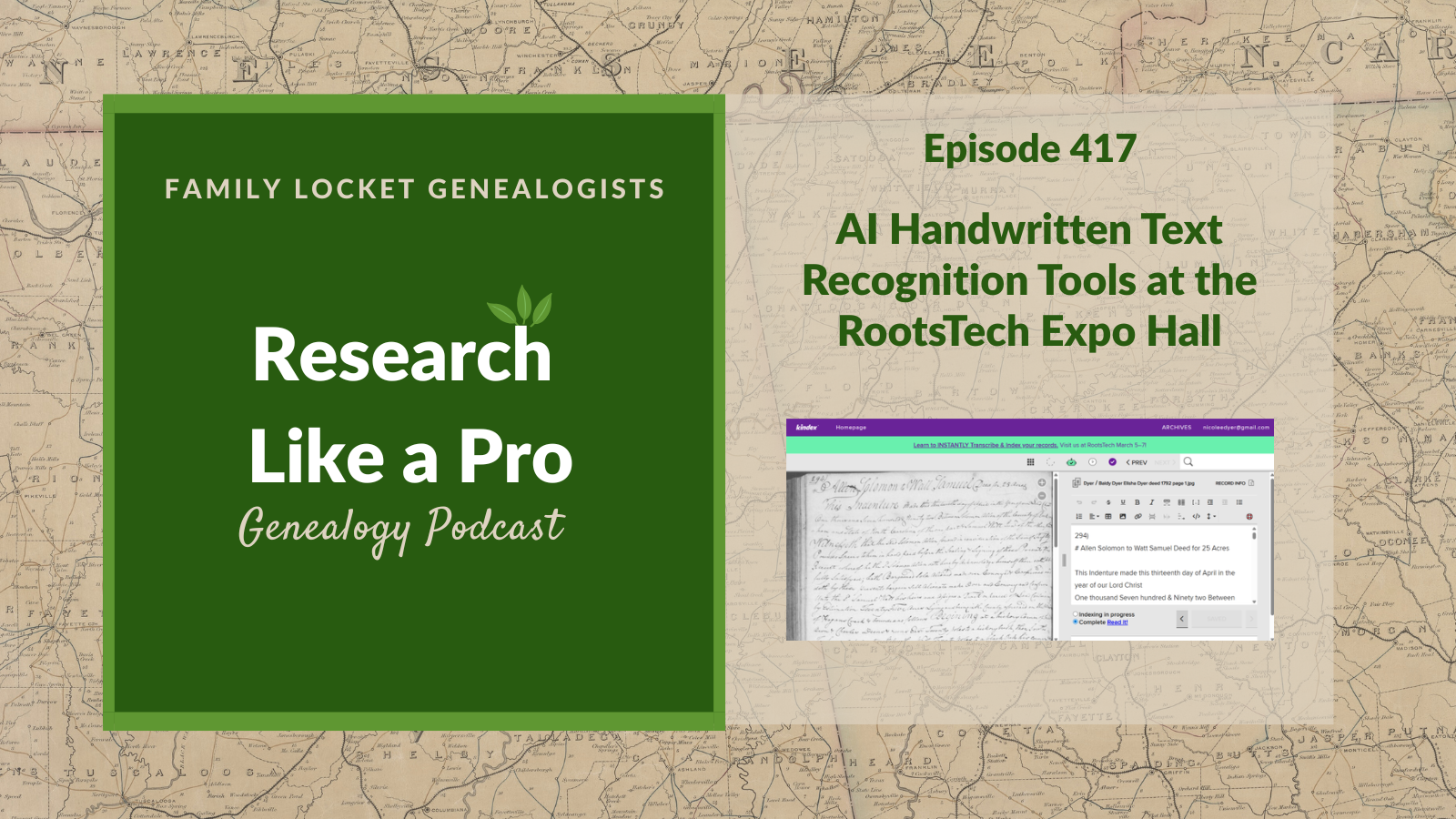
Diana Elder and Nicole Dyer discuss the evolution of AI Handwritten Text Recognition (HTR) tools, focusing on the platforms Nicole explored at RootsTech. They evaluate several key technologies used to decipher historical manuscripts. They discuss Kindex, which provides highly accurate transcriptions and a side-by-side editor for corrections. They also review Leo, an AI platform that handles secretary hand effectively and offers a side-by-side editor, though users should watch for minor hallucinations. Transkribus serves as a solution for difficult or uncommon scripts, offering results that can be further refined with LLMs.
The hosts also examine other tools, including 360 Mind, which functions as a browser extension but lacks strong language model processing. Goldie May utilizes Gemini for automatic transcription on research logs, providing high accuracy with the potential for occasional hallucinations. Finally, they cover MyHeritage’s Scribe AI, which transcribes and summarizes documents, though it currently lacks an in-tool correction feature. Nicole identifies Kindex and Leo as her preferred tools due to their side-by-side editing functionality. By listening, you learn the strengths and limitations of these AI transcription options and determine which tools best suit your research needs for historical records.
This summary was generated by Google Gemini.
Transcript
Nicole (1s):
This is Research Like a Pro, episode 417: AI Handwritten Text Recognition Tools at the RootsTech Expo Hall. Welcome to Research Like a Pro a Genealogy Podcast about taking your research to the next level, hosted by Nicole Dyer and Diana Elder accredited genealogy professional. Diana and Nicole are the mother-daughter team at FamilyLocket.com and the authors of Research Like a Pro A Genealogist’s Guide. With Robin Wirthlin they also co-authored the companion volume, Research Like a Pro with DNA. Join Diana and Nicole as they discuss how to stay organized, make progress in their research and solve difficult cases.
Nicole (41s):
Let’s go. This episode is sponsored by Newspapers.com. Hi everyone. Welcome to Research Like a Pro.
Diana (48s):
Hi Nicole. How are you doing today?
Nicole (51s):
Hey, I’m doing great. How about you? What’s going on?
Diana (54s):
Well, I’m continuing my watching slash listening to the NGS lectures and I thought today on the podcast I would talk about kind of an unusual one by our colleague Blaine Bettinger. And Blaine usually talks about DNA or AI and so when we saw this title in the compendium we’re like, what is this gonna be about? But it was such a fun class. So it’s titled, Postcards and Plants: Finding and Preserving These Heirlooms. And the description says, “Discover how postcards and heirloom plants preserve family stories, enriching genealogical research with memories that are both written and living.
Diana (1m 34s):
Learn how these overlooked heirlooms can bring the past to life and keep family traditions flourishing.” So it was a fun class and Blaine talked about how he is a postcard collector for a very specific place in New York where his family has been for generations. And there was a big fire in this hotel and so there were lots of pictures taken, this was early, I’m gonna say something like 1904, I may be wrong, that’s what I remember. And so he’s been, he goes on eBay and collects these postcards that are published about, you know, with these pictures that this fire. And he was funny because he talked about how sometimes he spends too much money on them, and you know off of eBay, if they’re really rare then they can be kind of pricey.
Diana (2m 23s):
So that was fun to hear him talk about that. So that part was about, you know, learning more about your family story because if you can find postcards from the era when something happened, you can just get some really interesting pictures, you know, from the front of the postcard and and learn more about their area. And then the part about plants was this whole idea of heirloom plants, plants that have been passed down, you know, like the Christmas cactus apparently is super hardy. And so people mentioned when he put out a Facebook query about, you know, do you have any heirloom plants? And people had the Christmas plant, Christmas cactus I think, I’m not sure. I don’t have that one.
Diana (3m 4s):
And how it would just could get passed down. And he talked about some, a grandmother that had African violets and how he loves plants. So anyway, that was fun. And I was thinking about some of our heirloom plants and I have a house plant that’s now on my fireplace mantle that my mom gave me a start of. And she apparently got a start from my grandma. So I was thinking I need to do starts and give it to all of my daughters. And it’s the heartiest plant ever. And I cannot remember the name of it now, but yeah, it’s an amazing plant.
Nicole (3m 43s):
Oh, wow.
Diana (3m 43s):
So that would be a fun one to pass down.
Nicole (3m 46s):
That would be fun. I love that. That’s so cool. When I talked with Blaine about the class, it was fun to think about are there any plants that have been passed down in the family? And it made me think of the plants that I would want from you. You know, I want some of your rhubarb. I know that that transfers well. And then I also have a sister-in-law who inherited a love for gooseberry plants from her husband’s family. And she has shared that with our whole family, you know, the extended Dyer family. And she’ll always make gooseberry pie for every Thanksgiving. And, and so it’s just a fun thing to think about the different heirlooms beyond the traditional ones we think of.
Diana (4m 29s):
Agreed. And I love the idea that you can think of a plant that you saw in a garden of an Ancestor and then you can plant it. It may not be the same one they planted, but you can plant the same variety, you know? So I, my grandmother grew Hollyhocks, which I don’t have any right now. I need to start growing them again. And they grow really, really tall and they have this fun flower and we would use those to make little plant people and the Hollyhock flower would be the dress. And so I am thinking I have got to do that so I can pass that down to my grandchildren. This this fun flower that my grandmother grew. It’s just a really old flower.
Diana (5m 10s):
So I, I like the idea. It was really unusual and different and fun and I’m glad NGS accepted that lecture and and Blaine worked it up.
Nicole (5m 18s):
Well thanks for sharing. It’s fun hearing all the NGS classes you’re listening to.
Diana (5m 23s):
Well, I’m having fun just seeing what people are teaching about. It’s just neat.
Nicole (5m 28s):
Well our announcements today are that our next webinar in the Research Like a Pro Webinar Series is Saturday July 18th, The Roskell Case: Untangling Crossed Trees on FamilySearch by Jessica Morgan, AG. It’s about Robert Roskell who was in England in 1803. And he is listed in FamilySearch’s tree with two sets of parents, three wives and three sets of children. So it’s about the critical thinking used to untangle Robert from his other two same-name identities. And so this is gonna cover Lancaster, parish registers, England census records, English vital records, Bishop Transcripts and so forth. And Jessica’s a member of our team who’s accredited in England and she has a lot of experience researching and writing.
Nicole (6m 11s):
So you don’t wanna miss this. And if you haven’t registered yet for this year’s webinar series, you can still do so and you’ll have access to all 12 webinars for the year. The next study group is going to be this fall and it begins August 26th, Research Like a Pro study group. And it’s our 12th study group if you can believe that. And it will be meeting for nine lessons. Registration is ongoing, the price to register is $400. So we hope that you will join us and if you are not a member of our newsletter, please sign up for that to get notifications of upcoming conferences, new posts, new content and things like that. We’re looking forward to the APG Professional Management Conference on October 14th through 17th and that’s gonna be online, it’s virtual and Diana’s doing a panel about teaching classes in genealogy and a class about managing client projects and client work using Airtable and Google Sheets.
Nicole (7m 8s):
And then I’m doing a panel on podcasting and I’m also doing a workshop on Airtable and transcription and research logging. So that will be a fun conference and we look forward to seeing you guys there
Diana (7m 21s):
At RootsTech someone Nicole spoke with mentioned choosing a theme ahead of time to help narrow down classes and expo hall experiences when you’re at RootsTech because there’s so many things that can be overwhelming. So she decided to focus on DNA and AI and looking back, Nicole could clearly see the AI handwritten text recognition or HTR tools, which happened to be the topic of class she actually taught in person was a common thread running through all the booths she visited. So last year she taught about this topic in 2025 and it was recorded and you can still go watch this, it’s titled AI Powered Transcription of Handwritten Documents, Tools and Techniques.
Nicole (8m 3s):
Yeah, that was a fun class to teach. It really forced me to learn about a bunch of different tools. And then I submitted again for this year for 2026. So I got to teach it again and this year I’ve kind of focused even more on the best tools and a new one that came up. So it’s been interesting to see the advances and the changes that happen every year in a fast paced field such as AI. And so I added some of those new tools to my talk for 2026 and I just thought it would be fun to go over some of those tools and also talk about some of the booths that I got to visit in the expo hall. And they’re still relevant even though RootsTech happened several months ago, especially if you’re interested in this topic of using AI to help you transcribe handwritten text.
Nicole (8m 52s):
And so the ones that I visited were Leo, which is a new tool at trileo.ai, Old Handwriting and Transkribus. And those ones were built specifically for HTR. And then there’s three other companies that include HTR as one of their features. So, Kindex and I visited their booth, Goldie May, and of course I visited Richard’s booth because he’s always pretty close to our booth and we’re pretty good friends with Richard. And then the MyHeritage company has an HTR tool for AI transcription, and I did not go talk with anyone at their booth, but they did talk about it on the main stage and demonstrate that.
Nicole (9m 37s):
So that was fun to see.
Diana (9m 38s):
Well I’m glad you had the chance to go visit their booths at such a perfect time to learn about new tools because the developers are often the ones that are there managing the booth and you can talk to them to directly and learn all about it, ask all of your questions. And it’s much more fun than emails or you know, chatting with a chat bot if they set that up on their website. So let’s talk first about Kindex and the virtual booth description from RootsTech says, “Search every word whether written or spoken instantly learn about our new auto indexing service, which conducts instant handwriting recognition, HWR, optical character recognition, OCR, speech to text, STT and image captioning.
Diana (10m 26s):
Also ask about our Granite Mountain backup solution.” And Nicole found that Kindex actually had highly accurate transcriptions and it has the side by side editor to help with corrections. And I love that because that’s really nice to be able to just go ahead, right then type in the right date or correct the spelling of a name or such. And I remember using Kindex years ago, I was using it to transcribe my great-great-great grandfather’s missionary journal when he was in England from 1850. And I had at that time was using people in the family or I was trying to get people to help because you could share the project and you’d get different people that could go in there and transcribe a page.
Diana (11m 14s):
Well that didn’t work out so well. I don’t think anybody ever did it. And I did a couple and then it just kind of ran outta steam. So it sounds like with AI I could actually go back and do that project now, which I hadn’t thought about for a long time. So that’s neat that Kindex has continued to keep up with the times and develop these new AI options for us because it’s really nice to think of the idea of crowdsourcing, but you know, you can’t always control other people. Whereas we can control AI and have it go to work for us.
Nicole (11m 48s):
Yeah, that’s such a good idea to go back to your project on William Henry Kelsey’s journal and get AI to do it for you. And I felt like the accuracy of a of Kindex when I tried it on the deed that I experiment with everywhere on all the AI tools, I felt like it was really, really good, high up there. Like one of the most accurate along with like Google AI Studio with Gemini 3, which is outstandingly accurate. So it’s really exciting to see this genealogy focused tool that helps you basically transcribe your personal archive and any, you know, diaries, letters, things like that, that have been passed down to you and get those transcribed. And now you can do it with the help of AI right there in their software that they already had built.
Nicole (12m 33s):
And it’s nice to be able to go through each page that’s been automatically transcribed by the AI and then compare it side by side and then check it off that it’s done, and then you can just kind of have this little task that you do sometimes to compare the transcription with the original and then check it off when you’re done. So it’s just kind of a fun little task that you can do from time to time.
Diana (12m 56s):
That sounds like a really good option for that journal. And I have to return to that and do that.
Nicole (13m 2s):
Right. And William Henry Kelsey had a lot of journals and diaries like he had several years of, so it would be a lot of work to get those all done. And I know some of our relatives have already done it and typed it, but some, it did have some errors,
Diana (13m 15s):
Right, because I found the original was down at the special collections at Brigham Young University and so I had them digitize it for me. So I have the digital images up on FamilySearch and as I was starting to do this myself, I noticed that there were errors in the original transcription and so I wanted to go through and make sure we had a really accurate transcription because then eventually I want to write a, a history and use all of that information. And now I’m realizing that the reason I haven’t done it yet was ’cause I was waiting for AI to help. That’s a good excuse for any project we haven’t done yet. Right? We were waiting for AI to get to the point where it could help us.
Nicole (13m 58s):
Well we’re there, so we great news, we can pick this back up.
Diana (14m 3s):
Yep.
Nicole (14m 3s):
And I wonder, you know, if we have any family members who maybe it was hard to get them to help in the past, maybe now this is the time where they’re like, oh yeah, now it’s easy enough that I can do it. Because sometimes it’s hard to read old handwriting and it, if they tried one page and got stuck, then they wanted to give up, well now it’s done. They just have to go check it.
Diana (14m 22s):
Yeah, that’s a great idea. His handwriting was hard to read, it was hard, it was not easy. And I know that the more you look at handwriting, you know, if it’s the same person over and over, it can get easier. But he was writing at the end of the day, you know, after a long day of walking and talking to people and I know how my handwriting gets after a long day, you know, it’s not so great sometimes. And that’s how his was, so maybe it wasn’t so great anyway, but it was definitely not your clerk’s perfect handwriting that sometimes you see, you know, in documents.
Nicole (14m 55s):
Right. And I almost wonder if the clerk’s job depended on his writing. Like if his handwriting wasn’t that good, maybe they would hire someone else.
Diana (15m 3s):
Oh, that’s funny. That could be true. However, I have seen some clerks that should have been fired because their handwriting was not so good.
Nicole (15m 10s):
I agree. Oh my goodness. Well that was fun to talk about Kindex. Let’s go on to another booth that I visited. So Leo is found at tryleo.ai and their virtual booth description on the RootsTech website said, “Decipher your archive with Leo, the state-of-the-art AI for handwriting recognition. Leo instantly transcribes difficult historical manuscripts, preserving formatting, marginalia and tables with no training required. Our all-in-one platform organizes documents into a searchable digital library where you can compare AI models, translate text, and extract named entities. From generating summaries to modernizing scripts Leo transforms unwieldy historical sources into structured, searchable and contextualized insights at the click of a button.”
Nicole (15m 58s):
So I had the chance to go talk to the two guys who created this and it was really fun. They’re two like guys in their twenties from Cambridge, I think, somewhere in England. So it was fun to hear their accents and all that. And they really focused on like British documents and handwritten text that sometimes included like Latin from the 1500s to the 1700s. And so they really were tuned into some of these historical challenges with documents from that time period. Like they, like they mentioned in their description where there’s like, you know, annotations in the margins and formatting that means something that we need to try to preserve. So their tool has very accurate transcriptions and a bonus they handle the older secretary hand as well that you’ll see in a lot of early colonial records in the US, and but more even so more in the English records from like the 1600s and previous to that.
Nicole (16m 54s):
Their custom AI model is based on a language model. So you might see some minor hallucinations, which is true with all AI tools that transcribe things. They might have some things that are made up because it tries to fill in the gaps, but it has been fine tuned to historical text to be able to handle those marginalia, strikethroughs, super Scripts, abbreviations, and all those other things that make transcribing historical documents a little challenging. So it’s great. We’ll have another episode that goes into LEO even more.
Diana (17m 28s):
That’s great. And I have yet to try it, so I do want to try it. I, it just sounds fascinating. It sounds like a great program. Now let’s have a word from our Sponsor. This episode is brought to you by Newspapers.com, the ultimate resource for family history research. If you’ve ever hit a brick wall tracing your family tree Newspapers.com is the tool that breaks it wide open with billions of historical newspaper pages from across the country going back hundreds of years. You can find birth and death notices, the wedding announcements, obituaries, immigration records and stories about your ancestors you never even knew existed. Imagine reading a 1920s headline featuring your great-grandmother’s name, or discovering that a long lost relative was mentioned in a small town paper clear across the country.
Diana (18m 14s):
Those moments happen on Newspapers.com every single day. And the search tools make it surprisingly easy. Just type in a name, a place, a date, and start digging. It’s not just data, it’s your family’s actual story told in real time as history unfolded around them. Whether you’re just starting your family tree or you’ve been researching for years, Newspapers.com has something that will stop you in your tracks. Start uncovering your history today at Newspapers.com/FamilyLocket and enjoy 20% off your subscription. That’s Newspapers.com/FamilyLocket. Your family story is waiting to be found.
Nicole (18m 48s):
Well, I forgot to mention that Leo does have a side by side editor so you can see the image on the left and the transcription on the right. So that’s really handy. But like I said, we’ll we’ll talk more about that in a future episode. Well the next booth that I visited at the RootsTech Expo Hall was Transkribus, and they’ve been around for several years, we’ve talked about them before, their virtual booth description was, “Transkribus enables you to automatically recognize text easily, edit seamlessly, collaborate effortlessly, and even train your custom AI for digitizing and interpreting historical documents of any form.” So Transkribus is really good for difficult, old, or like uncommon scripts because no matter what script you have, you can always train your own custom model to fit that uncommon script.
Nicole (19m 38s):
And so sometimes that’s a little bit more work. But one of the great things about Transkribus right now with the current models is that while it has plenty of errors, it doesn’t have AI hallucinations where the AI kind of makes up a word or kind of fills in a blank for something, it can’t read with the wrong word. So that’s kind of nice because you can just see the errors right away because it looks like a, a word that doesn’t exist, you know, at Transkribus. But with like other AI tools like you know, Gemini or something, sometimes it will make up a word when it can’t read it. And so that’s sometimes harder to spot unless you know that you’re having to check all of those names, dates, and places.
Diana (20m 21s):
Well that’s really interesting because I have wondered about Transkribus and how they were doing. I haven’t used it for a while. When AI first started, you know, we first started doing transcription, that was when we all tried. So I appreciate your explanation that it’s really good for the difficult old or uncommon scripts and being able to train it. I think that what we’ll have to do with all of these is just decide what our real purpose is in doing the transcription and then matching that purpose to the tool. So I think this is so good to be going through all of these. I know I’m learning a lot,
Nicole (20m 58s):
Right? And one of the things that works really well with Transkribus is to use it for the first pass of a transcription of a document and then take the Transkribus transcription and upload it to a large language model like Gemini, and put in the Transkribus transcription along with the image and say, suggest corrections for this. And then because Transkribus has already gotten out like the closest match to the letter forms, even if it’s not quite right, the large language model can then use that, basically that word that has a couple errors in it. Like for example, instead of Tennessee you might see something like Finesse where it kinda looks like Tennessee, even though it got a couple letters wrong and then the large language model can detect that and suggest the right word.
Diana (21m 44s):
Right, and that’s what I did do a couple years ago. I know I was trying to do some transcription and the AI models at that time were just the large language models were just really challenged. And so I would do that, do a first pass with Transkribus and then send it over to ChatGPT or Claude or Gemini. So such a great tip. Well let’s go to talking now about 360 Mind or Old Handwriting AI. So this is at oldhandwriting.ai and their virtual booth description for RootsTech says, “We develop software solutions for Genealogists. At Roots Tech we’ll be showing our old handwriting AI transcription software that works right in your web browser.”
Diana (22m 28s):
This is, so this is a browser extension for Chrome that allows you to transcribe text on the page. So when Nicole tested the app for her deed, it was not very accurate. You know, it seems like it could be similar to Transkribus in that it really tries to read each character, but it’s large, it’s language model processing isn’t very strong, so it’s a trade off. You get many errors but not hallucinations.
Nicole (22m 52s):
Right. Yeah. And that one might improve over time hopefully. Another booth that had AI handwritten text recognition is Goldie May and the virtual booth description for Goldie May is, “Do more genealogy in less time with Goldie May. Speed up research, untangle family trees and stay happily organized. It works with FamilySearch, Ancestry, and the websites you already use, it does not replace your genealogy programs, however, it might replace your spreadsheet, your notebook, the papers on your desk and the sticky notes on your monitor. All the places where you track your research and sort out what you are finding. Keep the family tree you already have and see if Goldie May can add to it.” I was talking to Richard before RootsTech and he mentioned that he added this feature to do automatic transcription of handwritten text with Gemini just right before the conference.
Nicole (23m 41s):
And it was really fun to test that out and see how easy it was. So basically if you take a screenshot with the Goldie May extension, then Gemini within the Goldie makes Goldie May browser extension sidebar can then transcribe it. And so that was a brand new feature back in February and it’s so exciting to see Gemini and other tools be incorporated into tools we already use. And Gemini is one of the most accurate large language models for handwritten text recognition. Because it is a language model that will hallucinate every once in a while, so always fact check, but it’s often better than humans for English in the last 300 years. So you can go to the Goldie May website and check it out www.goldiemay.com and it’s just a great, if you’re already a paid subscriber at Goldie May, you should definitely start using it.
Nicole (24m 32s):
So with the Goldie May plus $15 a month, you get 400 AI credits per month.
Diana (24m 36s):
Well that’s neat. I’m so glad to see the Richard incorporating AI. It’s wonderful to see all these different programs that we like these websites taking AI and using it for to help them be even better. Well the next one we’re going to talk about is through MyHeritage. It’s called Scribe AI. And their virtual booth description says, “MyHeritage offers users a meaningful discovery experience that unites their past, present, and future using sophisticated matching technologies, billions of international historical records and at-home DNA tests. It is also home to the world’s best technologies for improving historical photos, including deep nostalgia, the viral feature for animating historical photos> the MyHeritage DNA test pinpoints the specific places your ancestors came from across 2,114 geographic regions providing the most in-depth analysis of any consumer DNA test.
Diana (25m 29s):
MyHeritage also offers a wealth of resources for expanding family history research, including a free online course and hundreds of articles and videos housed on the MyHeritage Knowledge Base.” MyHeritage launched their Scribe AI tool that transcribes, translates and summarizes historical records, but unfortunately it doesn’t yet allow users to correct the transcription and that perpetuates errors into translation and summary. So the FAQ suggests copying and pasting to a text editor to make manual corrections to the transcription. So if you’re already a My Heritage user, you might want to just use that. It sounds like it’s got an extra step though to make sure you’ve got everything accurate, so that might be a little bit challenging or just take a little extra time.
Nicole (26m 16s):
Yeah, it was pretty accurate. I mean, but every once in a while any AI tool is gonna make a mistake and it’s usually on something important like a name, date, or place. And so what’s interesting about Scribe AI is that it puts the summary of the record at the top and as you scroll to the bottom you can see the underlying transcription the AI did, and then you can see, oh this is, you know, this one thing is wrong and now the summary is wrong and, and so it has multiple things, it has a summary and like a list of all of the information from that document. And so it’s doing a lot of transformations to the original transcription. So if you could just fix the transcription before you do all those transformations, it would be much better and maybe they’ll add that, you know, eventually.
Nicole (27m 3s):
But it is really neat to see that they’re incorporating AI directly into their website and, and I think you do have to have a MyHeritage subscription in order to use that. So that might be an expensive option, but if you already have a subscription there, it’s definitely a good tool to try out. Well, I’ve tested all of the tools with my 1792 Rockingham County deed that I picked out where Baldy Dyer was a witness. So Goldie May with Gemini, Kindex, Scribe AI by MyHeritage, and Leo were all the most accurate. And because they have a side by side editor, my favorite tools are Kindex and Leo. I just love the ability to check the original image and correct the text side by side.
Nicole (27m 47s):
Well, if you haven’t tried any of these, give them a try and share how it goes with us in the comments for this podcast episode. I’d love to know which tools work best with different scripts and time periods. I am almost always testing in English from the 1700s to the 1800s. So if you’re working in a different time period, in a different place, it would be great to hear from other people about how AI tools work with their documents.
Diana (28m 14s):
Well, it’s been really fun to talk about all of these different options and I love that we have some options, you know, we don’t have to go with just one. We have lots of different things we can do. So if you are really interested in using AI and genealogy research and writing, our new addition of Research Like a Pro with AI workbook came out in February and we have it on as an eBook available on our website. We sold out completely at RootsTech of the spiral bound copies, so you know, if you really wanna print copy, you can get it printed at your local print shop. Or you can also have it just as an eBook, which is a Word file, and you might want to just, you know, type right into that.
Diana (29m 0s):
What I did to learn AI was to take the Research Like a Pro process, and I did a project a couple of summers ago, and for every single step of the process I tried using AI. It was the best way to learn because I was doing real research and I was trying all sorts of different things. You know, in, in a project you transcribe, you write, you make tables, you do so many different things, you do research planning, and I tried AI with all of it. It was great exercise. So if you’re kind of on the fence about using AI, that might be a fun way for you to get started.
Nicole (29m 37s):
I remember as you were working on that, how how much fun you had. Also with the Research Like a Pro with AI workbook, like she said, we are just selling that as an eBook right now. It comes with a couple files. You get a printable PDF file that you can print at home or take to your local print shop and get it bound yourself with the spiral binding. Or if you just prefer to work within that eBook in Word or Google Docs, you can use the file on your computer and there’s little boxes for you to type into as you do the exercises. So we hope that that’s useful for you. Well, thanks everyone for listening today. We hope you have a great week, and we’ll talk to you again next week.
Nicole (30m 18s):
Bye-bye.
Diana (30m 18s):
All right, bye-bye everyone.
Nicole (30m 20s):
Thank you for listening. We hope that something you heard today will help you make progress in your research. If you want to learn more, purchase our books, Research Like a Pro and Research Like a Pro with DNA on Amazon.com and other booksellers. You can also register for our online courses or study groups of the same names. Learn more at FamilyLocket.com/services. To share your progress and ask questions, join our private Facebook group by sending us your book receipt or joining our courses to get updates in your email inbox each Monday, subscribe to our newsletter at FamilyLocket.com/newsletter. Please subscribe, rate and review our podcast. We read each review and are so thankful for them. We hope you’ll start now to Research Like a Pro.
Links
AI Handwritten Text Recognition Tools at the RootsTech Expo Hall – https://familylocket.com/ai-handwritten-text-recognition-tools-at-the-rootstech-expo-hall/
Sponsor – Newspapers.com
For listeners of this podcast, Newspapers.com is offering new subscribers 20% off a Publisher Extra subscription so you can start exploring today. Just use the code “FamilyLocket” at checkout.
Research Like a Pro Resources
Airtable Universe – Nicole’s Airtable Templates – https://www.airtable.com/universe/creator/usrsBSDhwHyLNnP4O/nicole-dyer
Airtable Research Logs Quick Reference – by Nicole Dyer – https://familylocket.com/product-tag/airtable/
Research Like a Pro: A Genealogist’s Guide book by Diana Elder with Nicole Dyer on Amazon.com – https://amzn.to/2x0ku3d
Research Like a Pro with AI Workbook – Second Edition (eBook) – https://familylocket.com/product/research-like-a-pro-with-ai-workbook-second-edition-ebook/
14-Day Research Like a Pro Challenge Workbook – digital – https://familylocket.com/product/14-day-research-like-a-pro-challenge-workbook-digital-only/ and spiral bound – https://familylocket.com/product/14-day-research-like-a-pro-challenge-workbook-spiral-bound/
Research Like a Pro Webinar Series – monthly case study webinars including documentary evidence and many with DNA evidence – https://familylocket.com/product-category/webinars/
Research Like a Pro eCourse – independent study course – https://familylocket.com/product/research-like-a-pro-e-course/
RLP Study Group – upcoming group and email notification list – https://familylocket.com/services/research-like-a-pro-study-group/
Research Like a Pro Institute Courses – https://familylocket.com/product-category/institute-course/
Research Like a Pro with DNA Resources
Research Like a Pro with DNA: A Genealogist’s Guide to Finding and Confirming Ancestors with DNA Evidence book by Diana Elder, Nicole Dyer, and Robin Wirthlin – https://amzn.to/3gn0hKx
Research Like a Pro with DNA eCourse – independent study course – https://familylocket.com/product/research-like-a-pro-with-dna-ecourse/
RLP with DNA Study Group – upcoming group and email notification list – https://familylocket.com/services/research-like-a-pro-with-dna-study-group/
Thank you
Thanks for listening! We hope that you will share your thoughts about our podcast and help us out by doing the following:
Write a review on iTunes or Apple Podcasts. If you leave a review, we will read it on the podcast and answer any questions that you bring up in your review. Thank you!
Leave a comment in the comment or question in the comment section below.
Share the episode on Twitter, Facebook, or Pinterest.
Subscribe on iTunes or your favorite podcast app.
Sign up for our newsletter to receive notifications of new episodes – https://familylocket.com/sign-up/
Check out this list of genealogy podcasts from Feedspot: Best Genealogy Podcasts – https://blog.feedspot.com/genealogy_podcasts/


Leave a Reply
Thanks for the note!